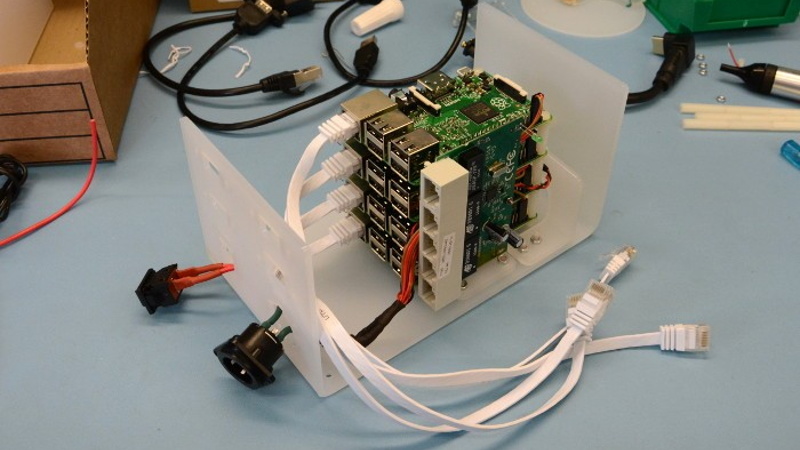

It looks like a prop from a science-fiction movie, runs an operating system named after one of cinema’s most notorious alien invasions, and contains enough blinking lights to make visitors ask whether it controls a satellite. In reality, the Raspberry Pi Cluster From Outer Space is something even more interesting: a compact, four-node laboratory for exploring Plan 9, distributed computing, networking, and the wonderfully strange history of operating-system research.
No, This Raspberry Pi Cluster Did Not Fall From Orbit
Before anyone calls NASA, the “outer space” part of the name is a joke with several layers.
The original desktop cluster was built by engineer and open-source enthusiast Andrew Back as a platform for experimenting with Plan 9 from Bell Labs. Plan 9 itself was named after Plan 9 from Outer Space, the famously eccentric 1959 science-fiction film directed by Ed Wood.
The computer therefore has no alien technology, no meteorite-powered processor, and no tiny extraterrestrial systems administrator hiding behind the Ethernet switch. What it does have is a beautifully constructed enclosure, four Raspberry Pi computers, an unusual distributed operating system, and a glowing outline of Glendathe Plan 9 bunny mascot.
For additional nerd-credit, Glenda was designed by illustrator Renée French, who also designed the Go programming language’s gopher mascot. Plan 9 and Go share several important contributors and ideas, so the family resemblance is more than artistic coincidence.
Raspberry Pi computers really have traveled beyond Earth through projects such as Astro Pi aboard the International Space Station. This particular cluster, however, was designed for a desk rather than a launchpad. That is probably fortunate because acrylic enclosures are stylish but not especially famous for surviving atmospheric reentry.
What Was Plan 9 Trying to Accomplish?
Plan 9 was created at Bell Labs beginning in the late 1980s by researchers including Ken Thompson, Rob Pike, Dave Presotto, and Phil Winterbottom. Bell Labs had already helped produce Unix and the C programming language, so its operating-system team was not exactly learning computers from a weekend correspondence course.
The designers wanted to reconsider computing for a world in which networks were becoming normal. Unix had introduced the powerful concept that many resources could be treated like files. Plan 9 extended that idea across an entire distributed environment.
Everything Becomes a FileIncluding Remote Resources
In a Plan 9 network, storage, processes, devices, interfaces, and services can be represented through a file-like structure. Resources supplied by another computer can be imported into a local namespace and accessed in a relatively consistent way.
Instead of building a different communication mechanism for every network service, Plan 9 uses a protocol called 9P. A machine can publish a resource as a hierarchy of files, while another machine mounts that hierarchy into its own namespace.
This approach makes the location of a resource less important. A keyboard may be attached to one machine, a processor may live in another, and files may be stored on a third. From the user’s perspective, those resources can be assembled into one working environment.
Each Process Gets Its Own View
Plan 9 also gives processes private, changeable namespaces. One process can mount, rearrange, or hide resources without forcing every unrelated process on the system to see the same layout.
Imagine that every application is allowed to organize its own toolbox. One program might import a remote network stack. Another might mount a historical file archive. A third might connect to a service that presents live data as files. They can do this without rebuilding the global filesystem for everyone else.
That idea feels surprisingly modern. Containers, isolated application environments, network filesystems, service-oriented architecture, and edge computing use different technologies, but they wrestle with many of the same questions Plan 9 was asking decades ago.
Inside the Four-Node Raspberry Pi Cluster
The original Plan 9 cluster was not assembled as a loose pile of circuit boards held together by hope and warm USB cables. It was designed as a self-contained desktop machine.
Four Raspberry Pi Boards
The project used four Raspberry Pi 2 Model B computers stacked vertically on long nylon standoffs. At the time of construction, these boards offered a practical and inexpensive way to create several physical network nodes without filling a room with aging desktop PCs.
One Raspberry Pi served as the user-facing terminal. The other boards could be assigned roles such as CPU servers or file servers, allowing the builder to experiment with Plan 9’s distributed architecture using genuine separate machines.
A Built-In Ethernet Network
An internal Ethernet switch connected the four nodes. Mounting the switch inside the enclosure kept most networking cables out of sight and turned the cluster into one manageable unit.
This detail matters for more than appearance. Distributed systems live or die by communication. Even a small cluster teaches practical lessons about addressing, naming, boot order, node availability, network latency, and the consequences of unplugging the wrong cable while confidently insisting that nothing could possibly go wrong.
A Custom Space-Age Enclosure
The enclosure was made from laser-cut acrylic panels bent into shape. Folding two main pieces reduced the number of fasteners while creating a clean, futuristic shell.
A raised acrylic disc above the ventilation openings contributed little to computational performance but greatly increased the machine’s likelihood of being mistaken for equipment from a low-budget lunar base. This is a valid engineering objective. Not every component must calculate something; some components are employed full-time in the aesthetics department.
The front panel included an etched image of Glenda illuminated by an internal LED. Panel-mounted extension cables provided tidy external access to HDMI, USB, and Ethernet connections. Power for the Raspberry Pi stack and network switch entered through a three-pin XLR connector, giving the machine a sturdy professional connection instead of a tangled bouquet of wall adapters.
A Compact Terminal Setup
The terminal node connected to a small HDMI display and a compact 47-key Vortex Core keyboard. Together, they created a workstation that looked both retro and futuristicas though someone in 1992 had accurately predicted miniature computers but remained passionately committed to unusual keyboard layouts.
How the Plan 9 Raspberry Pi Cluster Works
A traditional Raspberry Pi cluster often runs Linux with tools such as MPI, Kubernetes, Docker, Slurm, or distributed storage software. Those systems divide workloads among separate computers through specialized frameworks.
The Plan 9 cluster approaches distribution at the operating-system level. Its nodes may be organized around three broad roles:
Terminal
The terminal handles direct interaction with the user, including the display, keyboard, mouse, and graphical environment. It does not necessarily have to perform the heavy computation itself.
CPU Server
A CPU server supplies processing resources. A user working at the terminal can start work on a remote CPU server while preserving access to the appropriate files and environment.
File Server
A file server provides persistent data to the rest of the network. Its files can be mounted into a process namespace through 9P, making remote storage feel like part of the local environment.
These roles do not require every node to behave like a completely isolated island. Plan 9 was built around cooperation. The operating system treats networking as a normal part of the computing environment rather than an accessory added after the “real” computer is finished.
That makes a multi-node setup the best way to understand Plan 9. Running it on one machine can demonstrate the interface and tools, but a cluster reveals the operating system’s central argument: the computer you are using does not have to be the computer doing all the work.
Is It a Real Supercomputer?
Technically, a cluster is a group of connected computers working together. In that broad sense, four Raspberry Pi boards absolutely qualify. Whether the machine deserves to be called a supercomputer depends on how generous you are feeling and whether any actual supercomputers are standing nearby.
Raspberry Pi clusters are not usually the most cost-effective route to maximum raw performance. A modern desktop processor may outperform several small boards while requiring less configuration, less networking, and considerably fewer microSD cards.
Research on Raspberry Pi cluster performance has repeatedly shown that scaling depends heavily on the workload. Tasks that require frequent communication between nodes can be restricted by network bandwidth and latency. Memory bandwidth, storage performance, thermal throttling, and operating-system overhead also affect results.
Embarrassingly parallel jobs perform better. These are workloads that can be divided into largely independent pieces, such as rendering separate frames, testing many parameter combinations, processing unrelated files, or running simulations that exchange little data.
The Plan 9 build was never intended to dethrone a national laboratory’s computing system. Its goal was experimentation. Judged as a teaching machine, it succeeds spectacularly because every node, cable, process, and failure is visible.
Why Build a Physical Cluster When the Cloud Exists?
Cloud services can create virtual machines in seconds. A physical Raspberry Pi cluster requires shopping, assembly, operating-system images, network configuration, cooling, power planning, and occasional conversations with a board that refuses to boot for reasons known only to itself.
That inconvenience is exactly why the physical cluster remains valuable.
You Can See the Architecture
Cloud infrastructure hides many details behind dashboards and APIs. A desktop cluster puts the hardware in front of you. When a node disappears, you can inspect its lights, power connection, temperature, network port, and storage device.
You Control the Entire System
There are no hourly instance charges and no surprise bill because a test workload spent three weeks calculating the meaning of life. The hardware remains available for repeated experiments, isolated networks, operating-system modifications, and intentionally destructive tests.
Failure Becomes Educational
A distributed application must cope with partial failure. One machine can crash while the rest continue operating. Storage can become unavailable. A network link can slow down. A configuration can work perfectly on three nodes and behave like a haunted toaster on the fourth.
A small cluster provides these lessons at a manageable scale. It is complicated enough to be realistic but small enough that you can label every machine without hiring a data-center operations team.
Building a Modern Version
A current recreation does not need to duplicate every component of the original Raspberry Pi cluster. The best design depends on whether the goal is historical Plan 9 experimentation, parallel computing, container orchestration, distributed storage, or an aggressively blinking conversation piece.
Choose Compatible Hardware
Verify operating-system support before purchasing boards. Plan 9 distributions and forks do not always support every Raspberry Pi model, controller, wireless chipset, or peripheral. Newer is not automatically easier when experimenting with an unconventional operating system.
Using identical boards simplifies installation and troubleshooting. Heterogeneous clusters can be educational, but differences in processor architecture, memory, boot firmware, and networking create additional variables.
Prefer Wired Networking
Wi-Fi is convenient for a single board. For a cluster, wired Ethernet generally provides more stable latency, predictable addressing, and easier diagnosis. A managed switch is useful when experimenting with network isolation, traffic monitoring, or multiple virtual networks, although a basic switch is enough for a small Plan 9 setup.
Plan Power and Cooling Together
Four separate adapters work, but they create clutter and invite accidental disconnection. A high-quality powered hub, a carefully designed shared supply, or Power over Ethernet can simplify the build.
Cooling should not be an afterthought. Closely stacked boards warm one another, especially during sustained workloads. Leave space for airflow, use appropriate heatsinks or fans, and monitor temperatures before assuming that the cluster’s sudden slowdown is an advanced feature.
Document Every Node
Record hostnames, addresses, board models, storage devices, operating-system versions, and assigned roles. Label the physical hardware as well. “I think the second board is the file server” is not a recovery strategy.
Experience Notes: What Living With a Tiny Cluster Teaches You
The first experience of assembling a Raspberry Pi cluster is usually not a triumphant benchmark. It is cable management. Four computers sound small until each one has power, networking, storage, mounting hardware, and a private desire to route its cables through the same narrow opening.
Once the structure is assembled, the project becomes a lesson in patience. Preparing multiple storage cards appears simple, but one incomplete image or corrupted card can create symptoms that look like a software bug. A disciplined builder verifies each node individually before stacking everything inside the enclosure. This feels slower for approximately twenty minutes and saves several hours of staring suspiciously at the network switch.
Booting the first Plan 9 node is also a reminder that familiar hardware can become unfamiliar under a different operating system. Commands, graphical behavior, device support, and configuration conventions may not resemble Raspberry Pi OS. The experience is less like installing another Linux distribution and more like visiting a parallel universe where many computing ideas evolved from the same ancestors but developed different accents.
The most satisfying moment comes when a remote resource appears inside a local namespace. Until then, terms such as “distributed operating system” and “9P protocol” can feel abstract. Watching one machine expose a service and another incorporate it into its working environment turns architecture into something concrete.
Failures become concrete too. Shut down a CPU server and a running job may disappear. Disconnect the file server and paths that looked local suddenly stop responding. Restore the connection and the system’s design becomes clearer than it ever would in a diagram. The cluster teaches through small, recoverable disasterswhich is also an accurate summary of professional systems administration.
Another common discovery is that additional nodes do not automatically make every task faster. A poorly divided program can spend more time exchanging data than computing it. When a four-node cluster loses to one node, the machine is not necessarily broken. It may be delivering an expensive but useful lecture about communication overhead.
Physical design has an equally large effect on the experience. A neat enclosure with visible activity lights invites experimentation. A heap of loose boards becomes fragile and gradually accumulates dust, mystery cables, and the vague threat of a short circuit. The original outer-space cluster succeeds because it treats presentation as part of engineering. The illuminated Glenda emblem may contribute zero processing power, but it gives the project identity and makes people curious enough to ask how it works.
Long-term use also encourages automation. Repeating the same setup on four nodes quickly becomes tedious, which naturally leads to scripts, reproducible images, configuration management, centralized booting, and better documentation. In other words, the cluster creates the problems that modern infrastructure tools were designed to solvebut at a scale where one person can understand the entire system.
The final experience is perspective. Computing history often appears to be a straight road from old machines to modern ones. Plan 9 reveals that it was actually a landscape full of alternate routes. Some of its ideas entered later systems, some remained specialized, and others still feel unusually elegant. Running those ideas on inexpensive Raspberry Pi hardware makes the history interactive rather than nostalgic.
Why the Raspberry Pi Cluster From Outer Space Still Matters
The Raspberry Pi Cluster From Outer Space is not important because it delivers record-breaking speed. It matters because it connects several generations of computing in one approachable machine.
Bell Labs’ research into distributed operating systems meets modern single-board hardware. A protocol designed decades ago runs across a miniature physical network. Laser-cut acrylic, glowing artwork, and a compact keyboard transform an abstract computing experiment into an object people want to investigate.
For students, the cluster offers a practical introduction to networking, operating systems, distributed resources, parallel workloads, and fault tolerance. For experienced developers, it provides an excuse to question assumptions that mainstream platforms make invisible. For makers, it demonstrates that a technically serious project can still have personality.
Most importantly, the machine shows that useful experimentation does not require a warehouse of servers. Four small boards, one switch, a curious operating system, and an unreasonable appreciation for illuminated bunny logos can be enough to explore an entirely different vision of networked computing.
Key project details verified against Andrew Back’s original build report and Hackaday’s project coverage.
Plan 9 architecture, namespaces, 9P, development history, and releases verified through official documentation and the Bell Labs technical paper.
Cluster design, educational value, network limitations, and performance tradeoffs synthesized from Raspberry Pi guidance and academic research.
The distinction between the desktop project and Raspberry Pi computers used in orbit was verified through NASA material.


