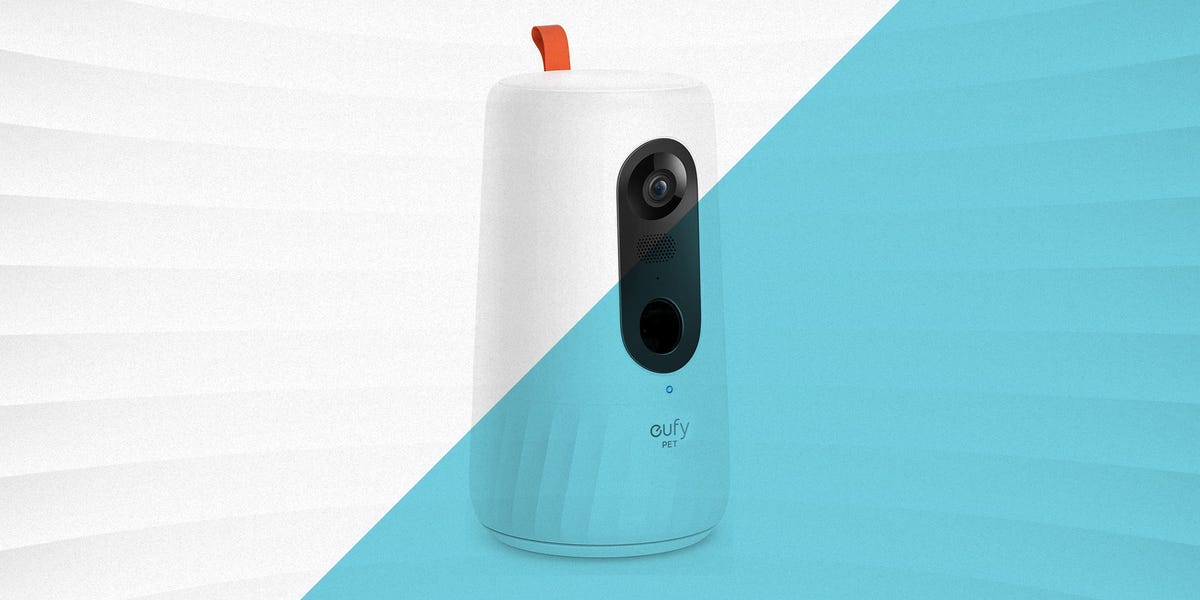

Leaving your pet at home can feel a little like handing the house keys to a tiny, furry roommate with no respect for throw pillows. One minute your dog is sleeping like an angel; the next, your cat is staring directly into the camera while pushing a glass off the counter with the confidence of a movie villain. That is exactly why the best pet cameras have become so useful for modern pet parents.
A good pet camera does more than show a live video feed. It helps you check on your dog, talk to your cat, monitor barking, toss treats, record funny moments, and notice signs of stress before they turn into chewed doorframes or mystery puddles. Some models are built specifically for pets, with treat dispensers, bark alerts, pet tracking, and subscription-based health insights. Others are technically indoor security cameras, but they work beautifully as affordable pet monitors.
This guide breaks down the best pet cameras by real-world needs: anxious dogs, mischievous cats, budget shoppers, treat-loving pets, multi-room homes, and owners who want privacy-friendly storage without paying for yet another monthly subscription. Because yes, even your dog has somehow joined the subscription economy.
What Makes a Pet Camera Worth Buying?
The best pet camera is not always the most expensive one. The right choice depends on your home layout, your pet’s behavior, and how much interaction you want while you are away. A simple camera may be enough if your pet mostly naps. A treat-tossing model may be better if you want to reward calm behavior. A rotating camera is ideal if your pet moves from couch to window to forbidden laundry basket like a tiny security threat.
Video Quality
At minimum, look for 1080p HD video. It is sharp enough to tell whether your dog is peacefully resting or actively eating the corner of your rug. Some newer cameras offer 2K or 4K resolution, which can be helpful if you need to zoom in on details. However, higher resolution also uses more bandwidth and storage, so it is not automatically better for every household.
Night Vision
Pets do not operate on human schedules. Cats especially seem to become most productive around 2:17 a.m., usually while rearranging gravity. Night vision lets you see what happens in low light, whether your pet is sleeping, pacing, playing, or performing suspicious kitchen investigations.
Two-Way Audio
Two-way audio lets you hear your pet and speak through the camera. For some animals, hearing your voice is comforting. For others, it creates a dramatic search party around the room as they wonder why you have become a wall. Still, this feature is useful for redirecting behavior, calming mild stress, or simply saying, “Please stop licking the sofa,” from three miles away.
Treat Dispensing
Treat dispensers are one of the main reasons people choose pet-specific cameras over standard security cameras. They allow you to reward your pet remotely, support positive training, and make check-ins more interactive. The downside is that treat cameras are usually larger, more expensive, and may require compatible treat sizes to avoid jams.
Motion, Sound, and Bark Alerts
Smart alerts can notify you when your pet moves, barks, meows, or makes unusual noise. For dogs with separation anxiety, these alerts can be especially valuable because they help you identify patterns. For example, if your dog begins barking five minutes after you leave, the camera gives you useful information for training and routine changes.
Privacy and Storage
Pet cameras are still cameras inside your home, so privacy matters. Look for strong account security, two-factor authentication, privacy mode, local storage options, and clear control over video history. Cloud storage is convenient, but local microSD storage can reduce ongoing costs and keep more control in your hands.
Best Pet Cameras by Category
Best Overall Pet Camera: Furbo 360° Dog Camera
The Furbo 360° Dog Camera is one of the most recognizable names in the pet camera world, and for good reason. It combines a rotating camera, treat tossing, two-way audio, barking alerts, and dog-focused smart features in one sleek device. The 360-degree view helps reduce blind spots, especially in living rooms where dogs like to wander between the couch, the door, and the exact spot where they are not supposed to be.
Furbo is especially strong for dog owners who want interaction. The treat tossing feature is fun, the app is polished, and the rotating design helps aim treats better than fixed cameras. The biggest drawback is that some advanced features are tied to a subscription. If you want smart alerts, cloud clips, or deeper behavior insights, you may need to budget for the ongoing plan.
Best for: dog owners who want a premium pet-specific camera with treats, alerts, and full-room viewing.
Best Treat-Dispensing Camera: Petcube Bites 2 Lite
The Petcube Bites 2 Lite is a strong choice if treat dispensing is your top priority. It offers 1080p HD video, night vision, two-way audio, digital zoom, and a wide-angle view. Its treat container is generous, making it practical for owners who want to use the camera as part of daily routines or reward-based training.
This camera is especially useful for pets who respond well to food motivation. You can toss treats at different distances, which turns a simple check-in into a mini game. It also works for both dogs and cats, though cats may judge your throwing accuracy harshly. The main limitation is that the camera does not offer the same kind of full pan-and-tilt movement as some rotating models, so placement matters. Put it where your pet spends the most time, not where you wish your pet spent the most time.
Best for: treat-loving dogs and cats, reward-based training, and owners who want a large treat dispenser.
Best Compact Rotating Camera: Petcube Cam 360
The Petcube Cam 360 is a compact, affordable pet monitoring camera with 1080p HD video, night vision, two-way audio, digital zoom, and rotating coverage. It does not toss treats, but it gives you a much wider view than a fixed camera and takes up very little space.
This model is a practical pick for apartments, cat rooms, home offices, and small living spaces. It is also a good option if you want pet-specific software without buying a large treat-flinging tower. The privacy mode is another helpful feature, allowing you to block the lens when you do not want the camera watching the room.
Best for: small homes, cat owners, budget-conscious shoppers, and people who want 360-degree viewing without a treat dispenser.
Best Budget Pet Camera: Wyze Cam Pan v3
The Wyze Cam Pan v3 is technically a security camera, but it is one of the best budget-friendly pet camera alternatives. It offers 1080p video, pan-and-tilt coverage, two-way audio, night vision, motion tracking, and indoor/outdoor versatility with the proper power setup. For the price, it delivers a lot.
This camera is ideal for owners who mainly want to check in and receive motion alerts. It does not toss treats or offer pet-specific emotional support features, but many households do not need those extras. If your pet is more “professional napper” than “emotional escape artist,” this may be enough.
Best for: shoppers who want a low-cost rotating camera for basic pet monitoring.
Best No-Subscription-Friendly Camera: Eufy Indoor Cam E220
The Eufy Indoor Cam E220 is a smart indoor camera that works well for pet monitoring because it offers 2K clarity, pan-and-tilt movement, motion tracking, night vision, two-way audio, and local storage support. One of its biggest advantages is that many useful features are available without forcing users into a monthly subscription.
Pet owners who care about privacy and long-term cost will appreciate local storage. Instead of paying month after month for basic video history, you can store footage on a microSD card. That makes the Eufy Indoor Cam E220 a sensible option for people who want reliable monitoring without turning their budget into a chew toy.
Best for: owners who want strong video quality, motion tracking, and local storage.
Best Indoor/Outdoor Pet Monitoring Camera: TP-Link Tapo C120
The TP-Link Tapo C120 is another security camera that doubles nicely as a pet camera. It offers 2K QHD video, pet detection, night vision, two-way audio, weather resistance, and local microSD storage. It is especially useful if your pet spends time in a covered patio, porch, yard-adjacent room, or indoor/outdoor transition area.
Unlike pet-specific treat cameras, the Tapo C120 focuses on clear monitoring and smart detection. It is a good fit for people who want a flexible camera for both home security and pet watching. It also supports local and cloud storage, giving owners more control over how recordings are saved.
Best for: homes where pet monitoring and general security overlap.
Best Alexa-Friendly Budget Camera: Blink Mini 2
The Blink Mini 2 is a compact, affordable plug-in camera that can work well for pet owners already using Amazon Alexa. It offers 1080p video, motion detection, two-way audio, color night view with a built-in spotlight, and simple app-based monitoring.
This is not the most advanced pet camera, and many recording or smart detection features may require a Blink subscription or extra hardware. However, it is easy to set up, small enough to place almost anywhere, and convenient for owners who simply want a quick way to check whether the dog is sleeping or silently organizing a snack heist.
Best for: Alexa households and owners who want a simple, compact monitoring camera.
Pet Cameras for Dogs vs. Cats
Dogs and cats use a home differently, so the best pet camera for a dog may not be the best one for a cat. Dogs often stay closer to entryways, crates, beds, or couches. Cats prefer vertical territory: windowsills, shelves, counters, and mysterious locations no one approved.
For Dogs
Dog owners should prioritize two-way audio, barking alerts, treat dispensing, and wide room coverage. If your dog has separation anxiety, choose a camera that records clips or sends sound alerts. This can help you understand whether your dog is barking at outside noise, pacing after you leave, or reacting to a predictable trigger like delivery trucks.
For Cats
Cat owners should think about placement and field of view. A rotating camera is helpful because cats rarely stay where you expect. Treat dispensing can be fun, but not every cat will respond to it. Laser toys built into cameras can be entertaining, but they should be used carefully and ideally paired with a physical toy or treat so your cat gets a satisfying “catch.” Otherwise, congratulations: you have invented frustration with Wi-Fi.
How to Choose the Best Pet Camera for Your Home
Start With Your Pet’s Main Behavior
If your pet sleeps most of the day, a simple camera may be all you need. If your dog barks, digs, chews, or panics when left alone, choose a model with sound alerts, clip recording, and reliable live viewing. If your cat is highly active, choose a camera with pan-and-tilt movement and place it where climbing, scratching, or window watching happens.
Think About Camera Placement
Even the best pet camera will disappoint you if it is pointed at the wrong corner. Place the camera near your pet’s favorite resting spot, crate, food area, or main room. For treat cameras, make sure the device is stable and placed where treats will land safely. Do not aim treats toward stairs, fragile decor, or the one rug you still believe is “too nice for the pets.”
Check Wi-Fi Strength
Pet cameras need reliable Wi-Fi. If the live feed constantly freezes, the camera becomes a very modern paperweight. Before buying, check whether the model supports 2.4 GHz Wi-Fi, 5 GHz Wi-Fi, or both. Many pet cameras still rely on 2.4 GHz because it travels farther through walls, but dual-band support can be helpful in crowded networks.
Compare Subscription Costs
Some cameras are inexpensive upfront but charge for cloud storage, smart alerts, pet detection, or video history. Others cost more initially but offer local storage and fewer monthly fees. Before choosing, calculate the one-year cost, not just the sticker price. A $40 camera with a required subscription may eventually cost more than a $90 camera with local storage.
Look for Privacy Controls
A pet camera should help you feel safer, not make you wonder who else is watching your living room. Use strong passwords, enable two-factor authentication when available, update firmware, and choose brands with clear privacy settings. Physical privacy shutters or app-based privacy mode are especially useful in shared households.
Are Pet Cameras Good for Separation Anxiety?
A pet camera can be a helpful tool for separation anxiety, but it is not a magic cure. It helps you observe what your dog does after you leave, how long stress signs last, and which behaviors appear first. Barking, pacing, drooling, destructive chewing, house soiling, and escape attempts can all be signs that your dog needs more support than a gadget alone can provide.
For mild cases, a camera can help you adjust routines, introduce gradual alone-time practice, and reward calm behavior. For more serious anxiety, work with a veterinarian, certified trainer, or veterinary behaviorist. The camera becomes part of the plan: useful for tracking progress, not a replacement for training or professional help.
Common Mistakes to Avoid
Buying Only for Treat Tossing
Treat tossing is fun, but it should not be the only feature you consider. Video quality, app reliability, alerts, privacy, and storage matter more for daily use. A camera that flings snacks but freezes every time your dog moves is basically a tiny unreliable vending machine.
Ignoring Subscription Details
Always check what works without a subscription. Some cameras allow live viewing for free but require payment for recordings, smart alerts, or pet-specific features. That may be fine, but it should not be a surprise after setup.
Using Your Voice Too Often
Two-way audio is tempting, but some pets become confused or more anxious when they hear your voice and cannot find you. Test it gently. If your dog relaxes, great. If your dog starts searching the house like you have become a ghost, use audio sparingly.
Placing the Camera Too Low
Low placement may give you a beautiful close-up of one chair leg and nothing else. Place the camera high enough to see the room, but not so high that you lose important details. For cats, consider elevated angles. For dogs, aim toward doors, beds, crates, or favorite resting areas.
Best Pet Camera Recommendations at a Glance
| Category | Recommended Camera | Why It Stands Out |
|---|---|---|
| Best overall | Furbo 360° Dog Camera | 360-degree view, treat tossing, two-way audio, barking alerts, and pet-focused features |
| Best treat dispenser | Petcube Bites 2 Lite | Large treat capacity, 1080p video, night vision, and interactive treat tossing |
| Best compact rotating camera | Petcube Cam 360 | Affordable 360-degree monitoring with privacy mode and two-way audio |
| Best budget pick | Wyze Cam Pan v3 | Low-cost pan-and-tilt camera with motion tracking and night vision |
| Best local storage option | Eufy Indoor Cam E220 | 2K video, motion tracking, local storage, and fewer subscription pressures |
| Best indoor/outdoor option | TP-Link Tapo C120 | 2K video, pet detection, weather resistance, and local/cloud storage choices |
| Best Alexa-friendly camera | Blink Mini 2 | Compact design, simple setup, two-way audio, and Alexa integration |
Real-Life Experience: What It Is Actually Like Using a Pet Camera
Using a pet camera sounds simple: plug it in, open the app, become an all-seeing guardian of the snack kingdom. In reality, it teaches you things about your pet you may not be emotionally prepared to know. For example, many owners discover that their “lonely, heartbroken” dog spends most of the day upside down on the couch, snoring with the commitment of a retired opera singer. Others learn that their cat has a strict 11 a.m. schedule for walking across the dining table like a runway model with tax problems.
The biggest benefit is peace of mind. When you are at work, running errands, or stuck in traffic, being able to check the live feed can calm your own anxiety. Instead of wondering whether your dog is barking nonstop, you can see the truth. Sometimes the truth is comforting. Sometimes the truth is that your pet has dragged a shoe into bed and formed an emotional support relationship with it. Either way, you know.
Pet cameras are especially helpful during transitions. If you recently adopted a pet, moved to a new home, changed your work schedule, or started leaving your dog alone for longer periods, a camera gives you real information. You can see whether your pet settles quickly, paces near the door, watches the window, ignores food, or becomes destructive. That information helps you make better decisions. Maybe your dog needs a longer morning walk. Maybe your cat needs more window perches. Maybe your puppy needs a safer confined space until the “I must taste the baseboards” phase passes.
Treat cameras can also create positive routines. For example, you might leave the house, wait until your dog lies calmly on the bed, then toss a treat. Over time, the camera becomes part of a reward system instead of just a surveillance device. The key is timing. Reward calm behavior, not frantic barking. Otherwise, your dog may learn that barking into the mysterious treat robot makes snacks appear, which is funny once and terrible forever.
There are a few practical lessons owners learn quickly. First, camera placement matters more than expected. A beautiful 2K camera is useless if your pet spends the day just outside the frame. Second, app notifications need adjusting. If every tail wag sends an alert, your phone will become a tiny panic machine. Third, two-way audio is not always calming. Some pets love hearing your voice; others find it confusing. Test it when you are nearby before relying on it from outside the house.
Finally, pet cameras are best used with common sense. They do not replace exercise, enrichment, training, veterinary care, or a safe home environment. They are tools. Very useful tools, yes, but still tools. The best results come when you combine monitoring with good routines: daily activity, puzzle toys, predictable departures, comfortable resting spaces, and realistic expectations. Your camera can show you what happens when you are gone. Your job is to use that information to make your pet’s day calmer, safer, and more comfortable.
Conclusion
The best pet cameras help you stay connected to your dog or cat without hovering like a nervous helicopter parent in slippers. For most dog owners, the Furbo 360° Dog Camera is a strong premium pick thanks to its rotating view, treat tossing, and pet-focused alerts. For treat dispensing, the Petcube Bites 2 Lite is practical and fun. For compact 360-degree monitoring, the Petcube Cam 360 is a smart value. If you want a budget camera, the Wyze Cam Pan v3 is hard to ignore. If privacy and local storage matter most, Eufy and TP-Link Tapo models deserve serious consideration.
The right pet camera is the one that matches your pet’s habits, your home layout, and your budget. Choose clear video, reliable alerts, secure storage, and features you will actually use. Your pet may not appreciate the technology, but you will appreciate knowing whether they are calm, safe, and definitely not eating something labeled “dry clean only.”
Note: Product prices, subscription features, and app capabilities can change. Review the latest manufacturer details before purchasing or publishing product-specific recommendations.


