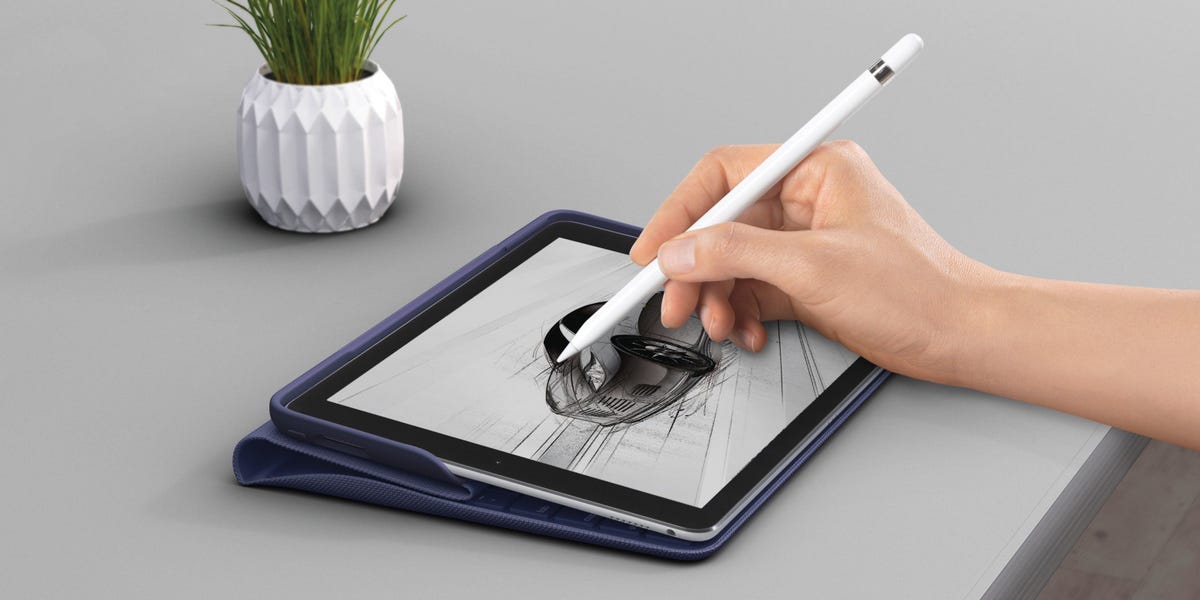
12 Best iPad Accessories 2017 – iPad Pro Accessories, From Keyboard Cases to Smart Covers

The 2017 iPad Pro was not just another shiny rectangle from Cupertino. With the 10.5-inch iPad Pro, improved Apple Pencil responsiveness, the Smart Connector, and iOS 11 on the horizon, Apple was practically waving a little flag that said, “Please stop calling this only a tablet.” But to turn an iPad Pro into a real work, study, travel, and creativity machine, you needed the right accessories. Not a drawer full of random cables. Not a case that weighs more than a small dog. The right accessories.
Why iPad Accessories Mattered So Much in 2017
In 2017, the iPad Pro lineup hit an interesting sweet spot. The 10.5-inch model offered more screen than the 9.7-inch iPad Pro while staying portable enough for backpacks, airplane trays, coffee shops, and couch-based “I am absolutely working” sessions. It supported the first-generation Apple Pencil, worked with Smart Connector keyboards, and paired well with iOS 11 features like drag and drop, a more useful Dock, and better multitasking.
That made accessories more important than ever. A keyboard case could turn the iPad Pro into a lightweight writing station. A Smart Cover could keep it thin and elegant. A stand could save your neck from the dreaded “tablet hunch.” A Pencil case could stop your $99 stylus from disappearing into the mysterious black hole known as the bottom of a backpack.
This guide focuses on the best iPad accessories 2017 buyers actually cared about: iPad Pro accessories, keyboard cases, Smart Covers, sleeves, stands, stylus tools, storage, and charging extras that made Apple’s tablet feel more complete.
How to Choose the Best iPad Pro Accessories
Start With Your iPad Model
Before falling in love with any accessory, confirm whether it fits the 10.5-inch iPad Pro, 12.9-inch iPad Pro, or older 9.7-inch model. In 2017, the 10.5-inch iPad Pro had its own size, which meant older cases did not always fit properly. Keyboard cases, Smart Covers, screen protectors, and sleeves all needed model-specific compatibility.
Decide: Productivity, Protection, or Portability?
The best iPad Pro accessory depends on what you actually do. Writers and students need a keyboard. Artists and note-takers need Apple Pencil storage and a stable drawing angle. Travelers want a sleeve, charger, and durable case. Minimalists want the Smart Cover and absolutely nothing else, because carrying a tablet should not feel like transporting a desktop printer.
Watch the Weight
Some iPad keyboard cases were excellent for typing but added serious bulk. A heavier case may be worth it if your iPad replaces a laptop. If you mainly read, sketch, browse, or watch movies, a slim cover and separate keyboard may be smarter.
12 Best iPad Accessories 2017
1. Apple Smart Keyboard for iPad Pro
The Apple Smart Keyboard was the most obvious iPad Pro keyboard accessory in 2017, and for good reason. It used the Smart Connector, so there was no Bluetooth pairing, no separate keyboard battery, and no late-night search for a charging cable. Attach it, fold it into typing position, and start working.
The biggest advantage was convenience. The Smart Keyboard doubled as a lightweight front cover, which made it ideal for students, commuters, and writers who wanted a keyboard without turning the iPad into a bulky laptop clone. The fabric-covered keys were not everyone’s favorite typing experience, but they were spill-resistant, slim, and surprisingly practical.
Best for: minimalists, writers, students, travelers, and anyone who hates charging one more gadget.
2. Logitech Slim Combo Keyboard Case
The Logitech Slim Combo was one of the most feature-packed iPad Pro keyboard cases of 2017. Designed for the 10.5-inch iPad Pro, it used the Smart Connector, included a detachable backlit keyboard, and offered multiple use modes for typing, viewing, reading, and FaceTime.
Unlike Apple’s Smart Keyboard, the Slim Combo gave users a more traditional keyboard feel, a row of shortcut keys, backlighting for dim rooms, and a protective shell. The trade-off was bulk. This was not the accessory for people who wanted their iPad to stay feather-light. But for serious typing, it was one of the best iPad Pro accessories 2017 had to offer.
Best for: heavy typists, students, office users, and people who want keyboard protection in one package.
3. Logitech Create Backlit Keyboard Case
Before the Slim Combo became a favorite for the 10.5-inch model, the Logitech Create helped define what a serious iPad Pro keyboard case could be. It connected through Apple’s Smart Connector, offered backlit keys, and felt more like a small laptop keyboard than Apple’s fabric-covered option.
The Create was especially popular among people who typed long documents, emails, notes, and reports. It included iOS shortcut keys and provided stronger protection than Apple’s own keyboard. However, it also added noticeable weight. Think of it as the keyboard case that said, “Yes, I skipped arm day, but your iPad did not.”
Best for: productivity-focused iPad Pro owners who value key travel and backlighting over slimness.
4. Brydge Keyboard for iPad Pro
The Brydge keyboard appealed to users who wanted their iPad Pro to look and feel more like a MacBook-style machine. With an aluminum body, Bluetooth connection, backlit keys, and hinge-style design, Brydge gave the iPad Pro a laptop-like posture without permanently trapping it in a folio case.
The Brydge design was elegant, sturdy, and visually matched Apple hardware better than many third-party cases. It was not the lightest option, and Bluetooth meant it needed charging occasionally, but the typing setup felt premium. For users who lived in email, writing apps, spreadsheets, or browser-based work, Brydge was a strong pick.
Best for: users who want laptop-style typing and a polished aluminum design.
5. Razer Mechanical Keyboard Case for 12.9-inch iPad Pro
The Razer Mechanical Keyboard Case was not subtle. It was made for the 12.9-inch iPad Pro and brought low-profile mechanical keys to Apple’s giant tablet. If Apple’s Smart Keyboard whispered, Razer’s keyboard clacked confidently into the room wearing a gaming headset.
This case offered individually backlit keys, a spacious layout, and a more tactile typing feel than most tablet keyboards. It was heavier and bulkier than many alternatives, and it relied on Bluetooth rather than the Smart Connector. But for people who loved mechanical keyboards, it was one of the most distinctive iPad Pro accessories of the era.
Best for: mechanical keyboard fans, long-form writers, and 12.9-inch iPad Pro users who prioritize typing feel.
6. ZAGG Rugged Messenger Keyboard Case
The ZAGG Rugged Messenger was a practical option for users who wanted protection first and typing secondbut still wanted the typing part to be good. It paired a protective case with a Bluetooth keyboard, often including backlit keys, a stand, and Apple Pencil storage depending on the model.
ZAGG cases were especially appealing to students, field workers, families, and anyone who knew their iPad might meet a desk corner, backpack zipper, or kitchen counter at high speed. The downside was predictable: extra bulk. But if your iPad’s daily life included travel, school, work sites, or younger siblings, rugged protection made sense.
Best for: students, travelers, families, and users who need extra protection.
7. Apple Smart Cover for iPad Pro
The Apple Smart Cover was the cleanest, simplest way to protect the front of the iPad Pro without adding much weight. It attached magnetically, woke the iPad when opened, put it to sleep when closed, and folded into a basic stand for typing or watching video.
It did not protect the back or edges, so it was not a rugged case. But that was also the point. The Smart Cover kept the iPad thin and elegant. For users who loved the iPad’s original design and only wanted screen protection, it was hard to beat.
Best for: minimalists, readers, home users, and anyone who wants light protection.
8. Apple Leather Sleeve for iPad Pro
Apple’s Leather Sleeve for the iPad Pro was expensive, yes. But it also solved a very real problem: carrying the iPad Pro and Apple Pencil together without dropping the Pencil into the abyss. The sleeve used premium leather, included a soft lining, and had a dedicated space for the Apple Pencil.
For 10.5-inch iPad Pro owners, the Leather Sleeve felt like a luxury accessory. It worked well for people who carried the iPad between meetings, classes, coffee shops, and client visits. It was not a drop-protection case, but as a stylish carry solution, it looked professional and aged better than many cheaper sleeves.
Best for: professionals, Apple Pencil users, and anyone who wants a polished carry setup.
9. Apple Pencil Case
The first-generation Apple Pencil was a fantastic tool, but it had one major personality flaw: it liked to roll away. The Apple Pencil Case gave the stylus a home. Made from leather, it offered a simple way to protect the Pencil when it was not being used.
This accessory was not flashy, but it was useful. The Apple Pencil was essential for artists, designers, note-takers, teachers, students, and anyone who marked up PDFs. A small case helped protect the tip, cap, and body from scratches and backpack chaos.
Best for: Apple Pencil owners who want to stop losing their stylus every other Tuesday.
10. Twelve South Compass Stand
A good stand can make an iPad feel far more useful, and the Twelve South Compass was one of the best-looking portable stands around. Its folding metal design supported the iPad in portrait or landscape orientation and worked well for watching videos, following recipes, making video calls, or using the iPad as a second screen.
For Apple Pencil users, a stand with a lower writing angle was especially helpful. Instead of laying the iPad flat or propping it against a mug like a tiny digital billboard, a real stand gave the tablet stability and better ergonomics.
Best for: desk setups, artists, video calls, recipe viewing, and second-screen use.
11. Anker PowerCore Portable Charger
The iPad Pro had strong battery life, but travel days have a way of laughing at battery estimates. A reliable portable charger from Anker was one of the smartest accessories for 2017 iPad owners, especially students, commuters, and travelers.
A power bank was not glamorous. Nobody unboxes a battery pack and whispers, “Behold, innovation.” But when your iPad hits 9 percent during a long flight, train ride, or conference day, a portable charger suddenly becomes the most beautiful object in the room.
Best for: travelers, students, conference attendees, and anyone away from outlets for long stretches.
12. SanDisk iXpand Flash Drive
Before iPad file management became more flexible, external storage accessories like the SanDisk iXpand were useful for moving photos, videos, and documents between an iPad, iPhone, and computer. For 2017 iPad Pro users working with media files, presentations, or offline backups, this was a handy tool.
The iXpand was especially useful for photographers, students, and business users who needed to transfer files without relying completely on cloud storage. It was not as seamless as modern USB-C workflows, but for Lightning-era iPads, it filled an important gap.
Best for: file transfers, photo backups, presentations, and users with limited iPad storage.
Best iPad Keyboard Cases: Which One Should You Pick?
Choose Apple Smart Keyboard for Simplicity
If you want the lightest typing solution that works instantly, the Apple Smart Keyboard is the safest pick. It is not the most luxurious typing experience, but the convenience is excellent. No pairing. No battery. No drama. Your future self will appreciate the lack of drama.
Choose Logitech Slim Combo for Versatility
If you type often and want backlit keys, shortcut keys, protection, and multiple angles, Logitech’s Slim Combo is a stronger productivity choice. It is heavier, but it earns its space in your bag.
Choose Brydge for a Laptop Feel
The Brydge keyboard is the best fit for users who want a premium aluminum look and a laptop-like posture. It is ideal for email, writing, and desk work, though not as flexible for drawing or casual tablet use.
Choose Razer if Typing Feel Comes First
The Razer Mechanical Keyboard Case is for people who care deeply about key feel. It is not the most portable accessory, but mechanical keyboard fans may forgive the weight after the first satisfying click.
Best Smart Covers, Sleeves, and Protection Options
Not everyone needs a keyboard case. In fact, many iPad Pro owners are better served by a Smart Cover, sleeve, or rugged case. The Apple Smart Cover is the best minimalist choice because it protects the screen and keeps the device slim. The Apple Leather Sleeve is better for professionals who carry the iPad around and want Apple Pencil storage. ZAGG and similar rugged cases make more sense for classrooms, travel, kids, or work environments where the iPad may take a few bumps.
The key is matching protection to lifestyle. If the iPad lives mostly on a desk and couch, a Smart Cover is fine. If it rides in a backpack next to keys, chargers, snacks, and whatever that mystery crumb is, use a sleeve or protective case. If it goes to school or job sites, choose something tougher.
Best Apple Pencil Accessories for 2017 iPad Pro Owners
The first-generation Apple Pencil was one of the biggest reasons to buy an iPad Pro. It was excellent for drawing, handwriting, annotating PDFs, editing photos, signing documents, and pretending your grocery list was a serious creative project.
However, the Pencil needed accessories of its own. A Pencil case protected it. A sleeve with built-in Pencil storage kept it from getting lost. Replacement tips were useful for heavy note-takers and artists. A stable stand or drawing angle also made Pencil work more comfortable. The best Apple Pencil accessory was not always the fanciest one; it was the one that kept the Pencil close when inspiration arrived.
Real-World Experience: Living With 2017 iPad Pro Accessories
Using the 2017 iPad Pro with accessories felt like building a tiny mobile office one piece at a time. The tablet itself was sleek and powerful, but the experience changed completely depending on what you attached to it. With no accessories, the iPad Pro was a beautiful slab of glass. With the right accessories, it became a notebook, sketchpad, video player, writing machine, recipe screen, travel computer, and PDF-markup station.
The first accessory most users noticed was the keyboard. Typing on glass worked for quick replies, but anything longer than a paragraph quickly became finger gymnastics. The Apple Smart Keyboard made the iPad feel instantly more serious. It was thin, quick to attach, and perfect for coffee-shop writing or class notes. The problem was comfort. For long writing sessions, users who preferred deeper keys often leaned toward Logitech, Brydge, or Razer. Those keyboards made the iPad feel more like a laptop, although they also reminded everyone that “portable” and “lightweight” are not always the same thing.
The Smart Cover created a different kind of experience. It made the iPad easier to carry around the house, safer to toss into a clean bag, and better for reading or watching video. It was not rugged, but it kept the spirit of the iPad intact. That mattered. Some keyboard cases made the iPad feel like it was wearing winter armor in July. The Smart Cover kept things simple.
Apple Pencil accessories were surprisingly important. The Pencil itself was wonderful, but storing it was awkward. Anyone who used the Pencil daily quickly learned that a loose stylus is a tiny white escape artist. A leather sleeve with Pencil storage, a Pencil case, or a case with a built-in holder saved time and frustration. For artists and students, that storage was not a luxury; it was sanity insurance.
A stand was another underrated upgrade. Once the iPad sat at eye level or a comfortable drawing angle, it became much easier to use for long periods. Watching movies, following cooking instructions, checking notes during a call, or sketching with the Pencil all felt better with a stable stand. The Twelve South Compass-style stand was especially useful because it folded down and looked like something designed for grown-ups, not borrowed from a plastic toy bin.
Portable charging and external storage were less exciting but extremely practical. A power bank turned long travel days from battery anxiety into calm productivity. A Lightning flash drive helped with moving files before iPad workflows became more cloud-friendly and flexible. These accessories did not make the iPad look cooler, but they made it more dependable. And dependability is very attractive in a gadget, even if it never gets applause.
The biggest lesson from living with iPad Pro accessories in 2017 was this: do not buy everything. Buy around your habits. If you write every day, invest in a keyboard. If you draw, protect the Apple Pencil and get a good stand. If you travel, focus on sleeves, charging, and storage. If you mostly read and stream, keep it light with a Smart Cover. The best setup is not the one with the most accessories. It is the one that makes the iPad easier to use without turning your bag into a tech museum.
Final Verdict: The Best iPad Accessories 2017 Buyers Should Remember
The best iPad accessories of 2017 helped the iPad Pro grow from a premium tablet into a flexible work and creativity tool. Apple’s Smart Keyboard and Smart Cover delivered clean, minimalist convenience. Logitech, Brydge, Razer, and ZAGG offered stronger typing or protection options. Apple Pencil accessories made creative work easier. Stands, chargers, sleeves, and storage drives rounded out the setup.
If you are building a 2017-style iPad Pro kit today, start with three essentials: a keyboard if you type, Apple Pencil storage if you sketch or take notes, and a cover or sleeve that matches how rough your daily routine is. Everything else is optional. Useful, yes. Tempting, absolutely. Necessary? Only if it solves a real problem.
In short, the best iPad Pro accessories are the ones that make the device disappear into your workflow. When the keyboard feels natural, the Pencil is always nearby, the screen is protected, and the battery survives your day, the iPad Pro stops feeling like a tablet with add-ons. It becomes your portable command center, minus the swivel chair and dramatic villain lighting.
Note
This article focuses on 2017-era iPad Pro accessories and buyer needs. Some products may now be discontinued, replaced, or available only through third-party sellers, refurbished listings, or used marketplaces.


