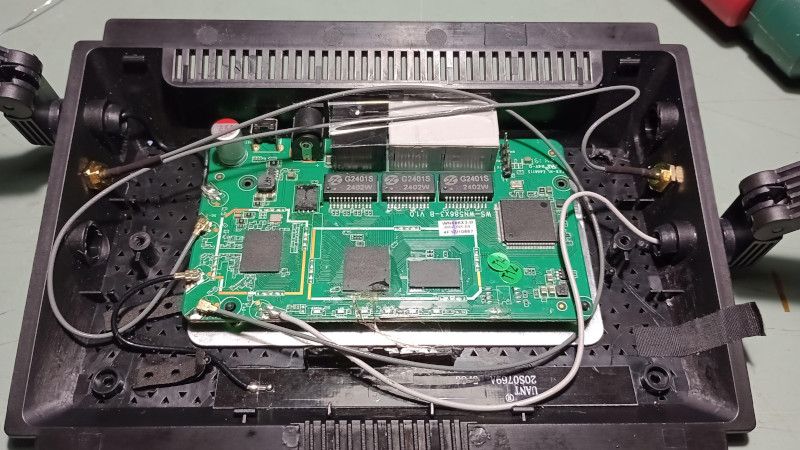

Note: This article is written for educational and informational purposes. Installing OpenWrt on unsupported hardware can permanently brick a router, void warranties, and create security or regulatory issues if done carelessly. Proceed like a careful tinkerer, not like a raccoon in a cable closet.
Introduction: When “Unsupported” Sounds Like a Challenge
Every hardware hacker knows the feeling. You spot a cheap router online, the specs look promising, the price is suspiciously friendly, and somewhere in your brain a tiny engineer starts whispering, “This could run OpenWrt.” Then the package arrives, you flip the device over, and there it is: a slightly different hardware revision. The supported model is revision 1. You received revision 2. Congratulations, you now own a tiny plastic mystery box with antennas.
Running OpenWrt on an unsupported router is not the same as installing a normal firmware update. On a supported router, you download the correct factory image, verify it, flash it, and enjoy your new life as the person in the house who says things like “I can segment that VLAN.” On an unsupported router, you may need to identify the system-on-chip, inspect flash memory, connect to a serial console, compare device trees, build custom images, test boot logs, and keep a recovery plan ready in case the router becomes a decorative paperweight.
Still, unsupported does not always mean impossible. It often means “not yet supported,” “not tested,” or “the hardware changed enough that someone needs to do the detective work.” The famous maker-style story behind OpenWRT, But On An Unsupported Router shows exactly that: a router that looked like a good OpenWrt candidate arrived in a different revision, and instead of giving up, the owner traced the hardware, experimented with booting, worked through flash access, and built a functioning path forward.
This guide explains what that process involves, why unsupported routers are risky, what makes OpenWrt so appealing, and how experienced users approach the problem without treating the flash button like a casino lever.
What Is OpenWrt and Why Do People Install It?
OpenWrt is a Linux-based operating system designed for routers, access points, and other embedded networking devices. Unlike most stock router firmware, OpenWrt gives users a writable file system, package management, command-line access, and deep control over networking features. In plain English, it turns many consumer routers from “black box with blinking lights” into configurable network appliances.
With OpenWrt, users can set up advanced firewall rules, guest Wi-Fi, VPN clients and servers, DNS filtering, bandwidth monitoring, ad blocking, mesh networking, VLANs, custom routing, and lightweight services. It is especially popular among home lab users, privacy-minded households, small offices, and people who simply dislike being told by a router app that “advanced settings are unavailable.”
The appeal is simple: OpenWrt can extend the useful life of hardware, improve transparency, and provide features that manufacturers often reserve for newer or more expensive models. It also receives community-driven updates for many devices long after the vendor has moved on to selling the next shiny box with more marketing stickers.
Supported vs. Unsupported Routers: The Crucial Difference
A supported OpenWrt router appears in the project’s hardware database or firmware selector with a specific model and version. That version detail matters. Router manufacturers often release several hardware revisions under the same retail name. The case may look identical, but the internal board can change dramatically.
One revision might use a MediaTek chipset, another a Qualcomm Atheros platform, and another a chip that lacks usable open-source wireless support. Flash size may shrink. RAM may change. Ethernet switch hardware may differ. The bootloader may expect a different firmware header. From the outside, two routers may look like twins. Inside, they may be cousins who stopped talking after Thanksgiving.
An unsupported router may fall into several categories:
- The hardware is too new and no one has added support yet.
- The model has a new revision with different flash, RAM, switch, or wireless chips.
- The device has too little flash or RAM for modern OpenWrt builds.
- The vendor firmware uses unusual partitions or locked-down installation checks.
- The chipset lacks open-source drivers or public documentation.
That is why OpenWrt installation advice always starts with the exact model and hardware revision. “Close enough” is fine for horseshoes and soup seasoning. It is not fine for router firmware.
The Wavlink-Style Scenario: A Router That Almost Matches
A common unsupported-router story begins with a device that appears to match an already supported model. For example, a buyer may order a router because revision 1 is listed as supported, only to receive revision 2. The supported image may not boot properly, may not flash through the stock interface, or may boot with broken Ethernet, Wi-Fi, LEDs, buttons, or storage detection.
In one widely discussed example, a low-cost Wavlink router became interesting because it appeared related to supported hardware and used a capable MediaTek Filogic-class platform. The problem was not that OpenWrt was fundamentally incompatible. The problem was that the new board revision needed investigation. The developer had to examine the manufacturer firmware, test booting methods, and work around flash access. At one point, even a Raspberry Pi served as a helper for interacting with a desoldered flash chip over SPI. That is not a normal consumer firmware update. That is router archaeology with a soldering iron.
The larger lesson is useful for anyone tempted by unsupported hardware: a router can be “almost supported” and still require significant work. The closer it is to a supported device, the better the odds, but the details still matter.
Why OpenWrt Support Depends on Hardware Details
OpenWrt is not a single universal image that magically boots every router. Each supported device needs the correct target platform, kernel configuration, device tree, partition layout, firmware packaging, and installation method. The image has to know where flash partitions live, how LEDs and buttons are wired, which Ethernet ports belong to LAN or WAN, how the wireless hardware is initialized, and how the bootloader expects the firmware to be formatted.
System-on-Chip
The system-on-chip, or SoC, is the heart of the router. It contains the CPU and often integrates networking and wireless components. OpenWrt must support the SoC family before a device port becomes practical. A router based on a well-supported MediaTek, Qualcomm Atheros, or similar platform is usually more promising than one built around poorly documented hardware.
Flash and RAM
Modern OpenWrt needs enough storage and memory to run reliably. Very old routers with 4 MB of flash and 32 MB of RAM are generally poor candidates for current releases. Devices with 8 MB flash and 64 MB RAM may be extremely tight. A router with 16 MB flash and 128 MB RAM is more realistic, while larger flash and RAM provide breathing room for LuCI, VPN packages, ad blockers, and other extras.
Flash Type and Partition Layout
Routers may use NOR flash, NAND flash, eMMC, or other storage arrangements. The partition map tells the firmware where the bootloader, kernel, root file system, configuration, calibration data, and recovery partitions live. A wrong partition layout can overwrite critical data. That is the sort of mistake that turns a router into a very light brick.
Wireless Drivers
Wireless support is often the hardest part. Ethernet may work while Wi-Fi remains broken, especially if the chipset needs proprietary blobs or calibration data. OpenWrt works best with hardware that has reliable open-source driver support.
Before You Flash: Research Like Your Router Depends on It
Before installing OpenWrt on unsupported hardware, gather information. Do not start by uploading random firmware. Start by building a hardware profile.
Check the Exact Model and Revision
Look at the label, retail box, web interface, FCC filings if available, and board markings. The model name alone is not enough. Search for the exact revision number, board ID, and firmware version. If the stock interface shows hardware details, save screenshots.
Compare with Supported Devices
Find supported OpenWrt devices with the same SoC, similar flash type, similar RAM, and similar Ethernet switch. This comparison can reveal whether an existing device tree or target profile might be adapted. However, never assume that a firmware image for a “similar” device is safe. Similar is not identical. Similar is how the toaster becomes a smoke machine.
Download and Inspect Stock Firmware
If the manufacturer provides firmware downloads, keep a copy. Tools such as binwalk, strings, hexdump, and firmware extraction utilities can help identify kernel versions, partition names, compression formats, device tree blobs, and bootloader expectations.
Find Recovery Methods
Before flashing anything, learn how the device recovers. Some routers have a bootloader web recovery page. Others support TFTP recovery, serial boot, dual firmware partitions, or vendor-specific recovery tools. If you cannot find a recovery method, treat the experiment as high risk.
The Tools Commonly Used for Unsupported OpenWrt Ports
Unsupported OpenWrt work usually requires more than a browser and optimism. The exact toolkit depends on the router, but several tools appear again and again.
Serial Console
A serial console is often the first serious step. By connecting a USB-to-TTL adapter to the router’s UART pins, users can watch boot logs, interrupt the bootloader, set boot commands, and diagnose why an image fails. Most router serial connections use 3.3V logic, not RS-232 voltage. Connecting the wrong adapter is a good way to teach the board about electricity one final time.
TFTP Booting
Many bootloaders can load a kernel or initramfs image over TFTP. This is valuable because it may allow testing OpenWrt without immediately writing to flash. Booting from RAM first is the polite way to ask, “Will this work?” before permanently rearranging the furniture.
SPI Flash Tools
If the flash chip is accessible, a programmer or even a single-board computer can sometimes read and write the chip externally. This allows backups and recovery when the bootloader no longer functions. It is powerful, but it requires care, correct voltage, clean wiring, and sometimes desoldering.
OpenWrt Build System and Image Builder
The OpenWrt build system is used to compile firmware and add device support. The Image Builder can create customized images for already supported targets, while deeper unsupported-device work may require editing device tree source files, target definitions, image recipes, and kernel options.
How Developers Add OpenWrt Support for a New Device
Adding support for a new router usually starts with a platform that OpenWrt already supports. If the SoC family is supported, the work becomes more manageable. If the platform itself is unsupported, the project becomes much bigger.
A typical device-support process includes identifying the SoC, reading the boot log, extracting the stock firmware, mapping flash partitions, finding GPIO assignments for LEDs and buttons, configuring Ethernet ports, ensuring Wi-Fi calibration data is preserved, and creating a device tree entry. The developer then builds an initramfs image for testing and later creates factory and sysupgrade images if safe installation paths exist.
The distinction between factory images and sysupgrade images is important. A factory image is usually designed for installation from stock vendor firmware and may include special headers. A sysupgrade image is used to upgrade an existing OpenWrt installation. Flashing the wrong type can fail, or worse, appear to succeed while quietly preparing chaos.
The Biggest Risks of Installing OpenWrt on Unsupported Hardware
The main risk is bricking the router. A soft brick means the device does not boot normally but can still be recovered through failsafe, TFTP, serial, or a recovery page. A hard brick means recovery may require external flash programming, JTAG, soldering, or replacement. The router may still be spiritually present, but it is no longer participating in network society.
Other risks include losing Wi-Fi calibration data, breaking Ethernet port mapping, disabling hardware acceleration, creating unstable wireless performance, overwriting vendor recovery partitions, or exposing the device because firewall defaults were not properly configured after a custom build.
There is also a regulatory angle. Wireless devices are certified with specific radio behavior. Custom firmware can expose settings that should not be changed casually, such as country codes, transmit power, and channel behavior. OpenWrt gives control, but control is not the same as permission to turn your router into a neighborhood weather radar.
Best Practices Before Attempting an Unsupported Install
Back Up Everything
Before writing to flash, back up the stock firmware, bootloader environment, and all calibration partitions. These small partitions may contain device-specific radio data. Losing them can permanently damage wireless performance.
Test from RAM When Possible
An initramfs boot is safer than writing directly to flash. If Ethernet, serial output, and basic system functions work from RAM, you gain confidence before moving to permanent installation.
Keep a Known-Good Recovery Image
Keep the vendor firmware and any recovery instructions available offline. Once the router is down, your internet may also be down. It is difficult to search for recovery instructions when the device responsible for internet access is currently sulking under your desk.
Document Every Step
Save boot logs, commands, firmware filenames, checksums, partition maps, and photos of the board. Good documentation helps you recover from mistakes and helps the OpenWrt community review your work later.
Do Not Guess the Partition Layout
Partition mistakes are among the fastest ways to destroy a recovery path. If you do not know where a partition begins and ends, stop and gather more information.
When an Unsupported Router Is Worth the Trouble
Unsupported OpenWrt work can be worthwhile when the router is inexpensive, the chipset is promising, the hardware is close to an existing supported model, and the owner has the tools and patience to recover from failure. It is also worthwhile when the end goal is community support. A successful port can help many other users with the same hardware revision.
However, if your goal is simply to get a stable home network tonight, buy a supported router. OpenWrt has many well-documented supported devices, and choosing one can save hours of frustration. Unsupported hardware is a project. Supported hardware is a weekend upgrade. Your family will notice the difference when the Wi-Fi disappears during dinner.
Practical Example: The “Almost Supported” Router Workflow
Imagine a router called the ExampleNet AX3000 v2. Revision 1 is supported by OpenWrt, but revision 2 is not. The smart workflow would look like this:
- Confirm the exact board revision and stock firmware version.
- Open the case and photograph the board, flash chip, RAM, SoC, switch, and UART pads.
- Connect a serial console and capture the boot log.
- Download the stock firmware and inspect it for device tree and partition information.
- Compare the hardware with supported devices using the same platform.
- Build or adapt an initramfs image for RAM boot testing.
- Verify Ethernet, LEDs, buttons, Wi-Fi detection, and flash layout.
- Back up all partitions before writing anything permanent.
- Create a sysupgrade or factory image only after the layout is understood.
- Submit clean documentation and patches upstream if the port works reliably.
This method is slower than random flashing, but slower is good. Slow means the router still has a pulse.
OpenWrt Security Benefits and Responsibilities
One reason people install OpenWrt is security. Vendor firmware can become outdated, and many consumer routers stop receiving meaningful updates while still handling every packet in the house. OpenWrt gives users a transparent update path, package control, firewall configuration, and the ability to run tools such as VPNs or DNS filters.
But OpenWrt is not magic security dust. After installation, users must set strong passwords, disable unnecessary services, keep firmware updated, configure Wi-Fi encryption properly, and avoid exposing management interfaces to the internet. A custom router can be safer than stock firmware, but only if configured responsibly.
Performance Expectations: Do Not Expect Miracles
OpenWrt can unlock features, but it cannot turn weak hardware into a data-center firewall. CPU speed, RAM, flash storage, wireless drivers, and hardware offload support still matter. A low-cost router may route basic home traffic beautifully but struggle with encrypted VPN throughput, heavy SQM traffic shaping, or large ad-blocking lists.
Unsupported routers can also suffer from early bugs. Ethernet port labels may be reversed. LEDs may blink like they are trying to send Morse code. Wi-Fi may need calibration fixes. Thermal behavior may be unknown. This is normal during a new port. The first working boot is not the finish line; it is the moment the router says, “Fine, I’m awake. Now what?”
Community Matters: Upstreaming the Work
The best unsupported-router projects do not stop at “it works on my desk.” They produce documentation, patches, install instructions, recovery notes, and eventually upstream support. Upstreaming helps the broader OpenWrt community maintain the device across future releases.
A clean submission should describe the hardware, include boot logs, document installation and recovery methods, preserve calibration data, and follow OpenWrt device-support policies. This is how one person’s stubborn router adventure becomes a stable option for everyone else.
Experiences and Lessons from Working With Unsupported OpenWrt Routers
The first experience most people have with an unsupported OpenWrt router is emotional whiplash. At 8:00 p.m., the router looks like a bargain. At 8:30 p.m., you discover the hardware revision mismatch. At 9:00 p.m., you are reading bootloader logs like ancient scrolls. By 10:00 p.m., you are explaining to yourself that this is “educational,” which is the traditional phrase hackers use when a project has started biting.
One useful lesson is that patience beats bravery. The brave user flashes first and researches later. The patient user backs up partitions, captures serial logs, checks image formats, and tests from RAM. Both users may end up with OpenWrt. Only one of them is likely to sleep peacefully.
Another lesson is that router manufacturers love changing hardware quietly. A retail listing may not mention the board revision. A store may ship whatever revision is currently in the warehouse. Two units with the same product photo can contain different flash chips or switches. For OpenWrt users, buying used hardware can sometimes be easier because sellers may photograph the label and revision. It feels odd, but a used router with a known revision may be safer than a brand-new mystery unit.
Serial access is often the turning point. Without serial, an unsupported router is mostly silent. With serial, it begins telling you what is wrong: bad magic number, wrong image header, failed flash read, missing device tree, broken Ethernet initialization, or kernel panic. Boot logs are not always friendly, but they are honest. They are the router’s way of saying, “Here is exactly why I am refusing to become useful.”
Recovery preparation is another hard-earned lesson. A device with a working bootloader recovery page is far less scary than one that requires soldering to a tiny flash chip. Before any serious experiment, users should test recovery mode if possible. Know the IP address, button sequence, accepted firmware format, and timing. Do not wait until after a failed flash to learn that the recovery procedure requires three hands and the reflexes of a competitive pianist.
Flash size also teaches humility. A router with 16 MB of flash may technically run OpenWrt, but package choices become important. Add LuCI, VPN tools, ad blocking, file system utilities, and extra drivers, and suddenly the storage budget feels like packing for a month-long trip in a sandwich bag. Bigger flash gives a project room to grow, especially as future OpenWrt releases and kernels become larger.
The best unsupported-router experiences end with contribution. Even if you never become a kernel wizard, you can help by posting clear photos, boot logs, flash chip markings, recovery instructions, and test results. Someone else may turn that information into a proper patch. OpenWrt support is built by a community of people who document what they learn, not just by mythical developers in hoodies compiling firmware under a full moon.
The final lesson is knowing when to stop. Not every router is worth saving. Some have locked bootloaders, unsupported wireless chips, tiny flash, or recovery methods that require more equipment than the router costs. There is no shame in choosing supported hardware. The goal is a better network, not proving dominance over a plastic box from a clearance bin.
Conclusion: Unsupported Does Not Mean Impossible, But It Does Mean Careful
OpenWRT, But On An Unsupported Router is more than a catchy hacker headline. It captures the real tension between curiosity and caution. OpenWrt can transform ordinary routers into powerful, transparent, customizable network devices. But unsupported hardware demands research, backups, serial logs, recovery planning, and a willingness to learn how the device actually boots.
If you want a reliable upgrade, choose a router already supported by OpenWrt and follow the documented installation steps. If you want an adventure, an unsupported router can teach you about embedded Linux, bootloaders, flash layouts, device trees, and the delicate art of not bricking things. Either path is valid. Just remember: the firmware file is not a magic spell. It is a very specific tool for very specific hardware.
In the end, the best OpenWrt projects combine curiosity with discipline. Back up first. Read twice. Flash once. And keep a spare router nearby, because the internet has a poor sense of humor when the main router is on the operating table.


