
Clan Chat in RuneScape is where the game stops feeling like a solo clicking simulator and starts feeling like a living, slightly chaotic medieval group chat with capes. Whether you play modern RuneScape or Old School RuneScape, clan chat helps you coordinate bosses, ask questions, share achievements, find events, and avoid the classic problem of wandering around Gielinor thinking, “Am I the only person who has no idea what I’m doing?”
This guide explains how to use Clan Chat in RuneScape in 11 practical steps. You’ll learn how to find the clan interface, join a clan chat, guest in another clan, speak in the right channel, manage chat settings, understand ranks, follow etiquette, and troubleshoot common issues. The instructions are written for real players: beginners, returning veterans, skillers, PvM learners, social butterflies, and that one friend who joins a boss trip with no food and unlimited confidence.
What Is Clan Chat in RuneScape?
Clan Chat is a dedicated communication channel for members of a RuneScape clan. It allows players in the same clan to talk across worlds, plan activities, welcome guests, organize events, and keep the community alive even when everyone is spread across different parts of the game.
In modern RuneScape, Clan Chat is tied closely to the clan system, the Community interface, clan ranks, permissions, and features such as guest clan chat. In Old School RuneScape, the modern clan system includes clan halls, recruitment tools, ranks, guest access, chat permissions, and event coordination. In both versions, the idea is simple: a clan chat gives your group a home base for conversation.
There is one important distinction: Clan Chat is not exactly the same as Friends Chat. Friends Chat is usually a temporary or owner-based chat channel, while Clan Chat is connected to an official clan structure. Many players still use the terms casually, but if you are trying to join a real clan community, you want the clan interface, not just a random friends chat room.
How to Use Clan Chat in RuneScape: 11 Steps
Step 1: Open the Community or Clan Interface
Start by opening the interface where RuneScape keeps its social tools. In modern RuneScape, you can usually reach the Community interface by pressing F5 or selecting the Community icon. From there, look for the Social area and the Clan Chat or Clan List section. If your interface has been customized, the icon may be tucked into your ribbon bar or hidden behind other interface elements.
In Old School RuneScape, look for the clan chat tab in the chat panel or social interface. OSRS also has the Clan Hub near the Grand Exchange, where players can create clans, find clans, and interact with clan-related features. If you are brand-new, the interface may feel like someone spilled icons into a drawer, but once you find the clan section, everything gets easier.
Step 2: Know Whether You Are Joining as a Member or a Guest
Before typing in a clan name, understand your status. A clan member is officially part of the clan and usually joins the clan chat automatically or through the clan interface. A guest is visiting another clan’s chat without being a permanent member.
Guesting is useful when you want to check out a clan before joining, ask for help, attend a public event, or use a community chat that welcomes visitors. Some clans allow anyone to guest; others restrict guest access by rank, combat level, total level, quest points, or internal rules. If a clan has guest chat locked, don’t take it personally. RuneScape clans protect their chat the same way players protect their bank PIN: carefully, and with mild suspicion.
Step 3: Join Your Clan Chat Channel
If you are already in a clan but cannot see anyone talking, you may have joined the clan but not entered the chat channel. Open the Clan Chat or Clan List interface and look for a join button, speech bubble, green plus icon, or similar symbol. Clicking it should place you into the active clan chat channel.
Once you are connected, the member list should populate with online clanmates. You may also see their worlds, ranks, icons, or status depending on the version of the game and interface settings. If the list is empty, confirm that you are actually in the channel and that your chat filters are not hiding clan messages.
Step 4: Guest in Another Clan Chat
To guest in another clan, open the guest clan chat option and enter the clan’s name. This is especially handy if you are looking for a PvM clan, skilling community, Ironman group, social clan, or event clan. Many recruitment posts will say something like, “Guest in our clan chat and ask for an invite.” That means you can visit the chat first, meet people, and decide whether the vibe is “friendly community” or “everyone yells about efficiency per second.”
When guesting, be polite. Say hello, mention that you are visiting, and ask whether guests are allowed to talk. Some clans let guests chat freely, while others only allow guests to read. If nobody answers immediately, don’t spam. RuneScape players may be bossing, AFK woodcutting, or fighting the most dangerous enemy in the game: their own inventory management.
Step 5: Type in the Correct Chat Channel
One of the most common mistakes is typing a message and realizing it went to public chat instead of clan chat. Depending on your game version and settings, you may be able to talk in clan chat by selecting the clan chat tab directly or by using a shortcut before your message.
In modern RuneScape, many players use // before a message to send it to clan chat from the main chat box. For guest clan chat, some layouts and settings may use a different slash shortcut. In OSRS, chat-channel behavior can vary depending on whether you have set a default channel, clicked a chat tab, or used channel commands. If your message appears in the wrong place, check your active chat tab and channel prefix.
Example:
- Public chat: “Anyone know where the bank is?”
- Clan chat: “//Anyone want to run a boss trip?”
- Guest chat: Use the guest chat tab or the appropriate guest-channel shortcut if enabled in your interface.
Step 6: Adjust Chat Filters and Colors
If you cannot see clan messages, your chat may be filtered. Check the icons above your chat box and make sure clan chat is enabled. In modern RuneScape, chat customization settings allow you to change how chat windows appear, show timestamps, adjust prefixes, and change channel colors. That is useful if your chat box looks like a rainbow had a disagreement with a spreadsheet.
Custom colors are not just cosmetic. They help you quickly separate public messages, private messages, friends chat, clan chat, guest clan chat, trade, and system notifications. If you participate in busy events, a clear color setup prevents you from missing important calls such as “world hop,” “bank now,” or “please stop standing on the dangerous tile.”
Step 7: Understand Clan Ranks and Permissions
Clan Chat is controlled by ranks and permissions. Common ranks include recruit, corporal, sergeant, lieutenant, captain, general, admin, organizer, coordinator, overseer, deputy owner, and owner. Exact rank names and symbols may vary between RuneScape versions, but the concept is the same: higher ranks usually have more authority.
Permissions can decide who may talk, invite players, kick guests, ban guests, manage ranks, edit clan information, organize events, or access clan features. In well-run clans, permissions keep the chat orderly. In poorly run clans, permissions are what happen five minutes before someone says, “Why did everyone get ranked admin?”
If you are a new member, do not worry about ranks too much. Focus on being helpful, following rules, participating in events, and not starting drama. Ranks usually come with trust, activity, and responsibility, not just a high combat level.
Step 8: Follow Clan Chat Etiquette
Good clan chat etiquette makes you welcome almost anywhere. Start with the basics: greet people, ask questions clearly, avoid spam, and respect the clan’s rules. If the clan has a Discord, forum post, or pinned message, read it. Many clans have rules about language, boss splits, lending items, PvP behavior, spoilers, merching, and event attendance.
Here are practical etiquette tips:
- Do not beg for gold, bonds, gear, or carries.
- Do not flood chat with repeated messages.
- Ask for help politely and include details.
- Thank people when they answer.
- Keep arguments out of public clan chat when possible.
- Respect moderators, admins, and clan leaders.
- Do not post suspicious links or promote scams.
Clan chat works best when it feels like a shared campfire, not a shouting contest in Varrock Square.
Step 9: Use Clan Chat for Events and Activities
Clan Chat is perfect for organizing RuneScape activities. You can find teammates for bossing, raids, minigames, skilling competitions, clue scroll parties, drop parties, achievement help, quest advice, and social events. A simple message like “Anyone up for God Wars?” or “Need one more for a learner raid” can turn a quiet evening into a full adventure.
For PvM clans, chat is often used to call roles, announce trips, share kill times, and celebrate rare drops. For skilling clans, chat may include portable locations, efficiency tips, daily challenges, citadel reminders, or experience milestones. For social clans, chat may be less about optimization and more about conversation, jokes, and asking why someone is still killing chickens at level 100 combat.
Step 10: Manage Safety, Reporting, and the Profanity Filter
RuneScape’s social tools are fun, but safety matters. If someone breaks game rules, harasses players, promotes scams, or posts harmful content, use the in-game reporting tools. Chat reports can include recent chat context, so report issues promptly instead of waiting until the evidence disappears into the digital swamp.
You can also use the ignore list to block irritating players. For language control, RuneScape includes a profanity filter that can apply across several chat channels, including clan-related channels. This is helpful if you want a cleaner chat experience or if your clan includes younger players. Even in a fantasy world full of demons, dragons, and suspiciously wealthy goblins, basic manners still matter.
Step 11: Leave, Rejoin, or Switch Clan Chats When Needed
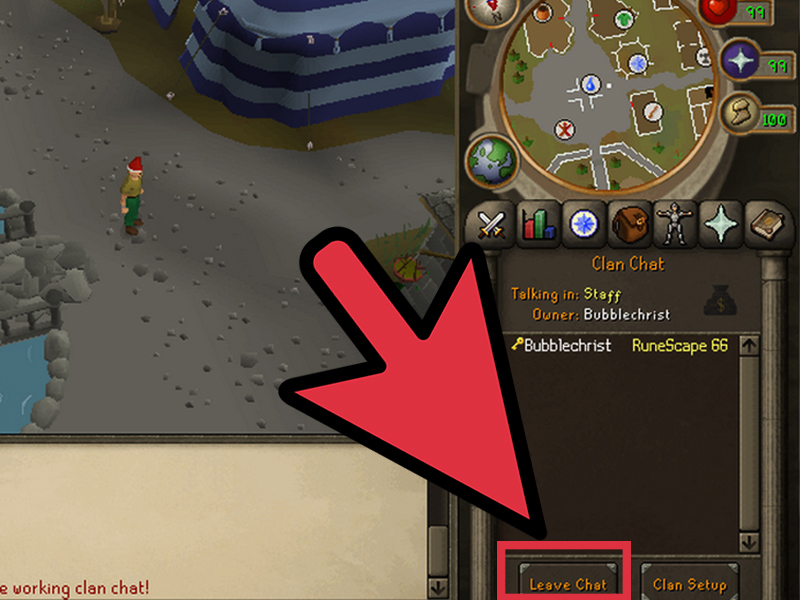
You can leave a clan chat channel without necessarily leaving the clan itself. This is useful if you want temporary silence, are troubleshooting chat, or need to focus. In the clan interface, look for a leave channel button. Clicking it may remove you from the chat until you rejoin or log back in, depending on the version and interface behavior.
Leaving the clan permanently is different. That usually involves a separate leave clan option and may include confirmation prompts. Do not confuse “leave chat channel” with “leave clan,” unless you enjoy accidentally resigning from a community and then awkwardly asking for a reinvite five seconds later.
Common Clan Chat Problems and Fixes
I Joined a Clan, but I Can’t See Anyone Talking
Open the clan interface and confirm that you joined the chat channel, not just the clan. Then check your chat filters. If clan chat is disabled or hidden, messages will not appear in your main chat box.
My Messages Go to Public Chat Instead of Clan Chat
Click the clan chat tab before typing, or use the appropriate shortcut for your version of the game. If you accidentally changed your default channel, switch it back through the chat interface or channel commands.
I Can Read Clan Chat but Not Talk
The clan may restrict talking permissions by rank or guest status. Ask a ranked member whether guests or new recruits can speak. If the chat is read-only for you, it may be intentional.
I Can’t Guest in a Clan Chat
The clan may have guest access disabled, a minimum requirement, a guest ban list, or a private chat policy. Double-check the clan name spelling first. RuneScape clan names can be creative, and by creative, we mean “occasionally impossible to type correctly on the first try.”
Clan Chat Is Too Busy
Adjust your chat filters, split chat windows, or change message colors. You can also minimize channels you are not actively using. A clean interface makes the game easier to follow, especially during PvM encounters where one missed call can turn into a free teleport to Death’s office.
Best Uses for Clan Chat in RuneScape
Clan Chat is more than a message box. Used well, it becomes a learning tool, planning board, help desk, event calendar, and social lounge. New players can ask basic questions without feeling lost. Returning players can catch up on updates. Experienced players can organize high-level content. Clan leaders can build a culture that keeps members coming back.
Some of the best uses include:
- Learning PvM: Ask for learner-friendly boss trips and role explanations.
- Finding teams: Recruit players for raids, minigames, and events.
- Skilling support: Share training methods, portable locations, and milestone goals.
- Community building: Welcome new members and celebrate achievements.
- Safety alerts: Warn members about scams, lures, or rule-breaking behavior.
- Event coordination: Announce start times, worlds, gear setups, and requirements.
Tips for Choosing a Good RuneScape Clan
A good clan should match your playstyle. If you love bossing, look for a PvM clan with learner events and clear split rules. If you prefer skilling, find a clan that celebrates experience milestones and does not treat every minute away from maximum efficiency as a personal tragedy. If you just want friends, choose a social clan with active chat and relaxed requirements.
Before joining, guest in the chat for a while. Watch how members talk to each other. Are questions answered kindly? Are leaders active? Are rules clear? Does the clan seem alive during your usual playtime? A clan can look amazing on paper but feel empty in practice. The best test is simple: spend time in the chat and see whether you enjoy being there.
500-Word Experience Section: What Using Clan Chat Actually Feels Like
Using Clan Chat in RuneScape changes the rhythm of the game in a way that is hard to appreciate until you experience it. When you first start playing, Gielinor can feel enormous. You are surrounded by quests, skills, bosses, cities, minigames, banks, teleports, and mysterious players wearing gear worth more than your entire account. Clan Chat turns that overwhelming world into something more manageable. Suddenly, there are people to ask, people to laugh with, and people who will say, “Don’t worry, everyone dies there the first time,” even if they are absolutely lying to make you feel better.
One of the best experiences is joining a clan as a quiet guest and realizing the chat has its own personality. Some clans are calm and helpful. Some are loud and funny. Some are focused on bossing, with members calling out mechanics, gear switches, and kill counts like a fantasy sports broadcast. Others are skilling clans where people celebrate level-ups, compare training methods, and gently roast anyone who says they enjoy Runecrafting a little too much.
Clan Chat is especially valuable when learning difficult content. Reading a guide is useful, but having someone in chat say, “Stand here,” “Pray this,” or “Bank now before you regret your entire life” is even better. Learner-friendly clans can make intimidating bosses and raids feel possible. You still have to practice, of course. Clan Chat will not magically make your clicks perfect, but it will give you encouragement, corrections, and occasionally a dozen people typing “gz” when you finally get the kill.
The social side matters just as much. RuneScape has always been a long-term game. Goals can take days, weeks, or months. Clan Chat makes those grinds less lonely. Chopping trees, mining ore, fishing, training Slayer, or working toward a quest cape becomes easier when people are chatting in the background. Sometimes the conversation is useful. Sometimes it is completely ridiculous. Either way, it keeps the game warm.
There are also lessons you learn quickly. First, every clan has a culture, and you should respect it. Second, the loudest chat is not always the best chat. Third, good clan leaders are worth appreciating because managing RuneScape players is basically herding cats, except the cats have godswords and strong opinions about drop splits. Finally, the best clan chat experience comes from contributing. Say hello. Answer questions when you can. Join events. Congratulate achievements. Be the kind of clanmate you would want to meet.
In the end, Clan Chat is not just a feature. It is one of the easiest ways to turn RuneScape from a solo grind into a shared adventure. Whether you are chasing rare drops, learning bosses, training skills, or simply looking for people who understand why a virtual cape can feel like a life achievement, a good clan chat makes the game better.
Conclusion
Learning how to use Clan Chat in RuneScape is one of the smartest moves a new or returning player can make. It helps you communicate with clanmates, guest in other communities, organize events, troubleshoot problems, stay safe, and enjoy the game with people who share your goals. The steps are simple: open the clan interface, join or guest in a chat, use the correct channel, adjust your settings, understand ranks, follow etiquette, and make the most of the community.
RuneScape is famous for its long grinds, deep systems, and unforgettable player stories. Clan Chat is where many of those stories begin. Use it well, and you will find advice, teams, jokes, events, friendships, and maybe even someone who reminds you to bring food before a boss fight. Treasure that person. They are doing Saradomin’s work.


