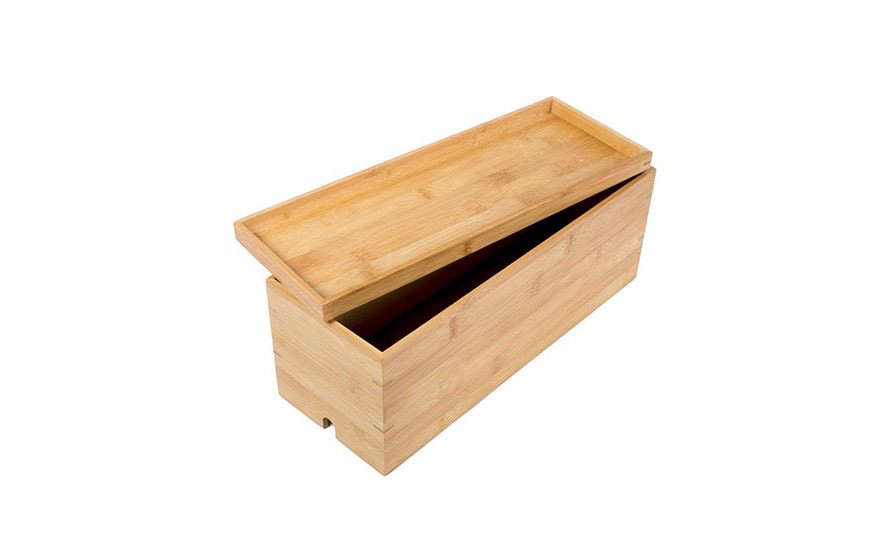

There is a special kind of household chaos created by modern electronics. It begins innocently with a phone charger, grows after adding a laptop and monitor, and eventually evolves into a mysterious nest of wires that appears capable of developing its own weather system. The G.U.S. Cable Box Management Organizer is designed to bring that tangle under control without making your home office or entertainment center look like an equipment closet.
Also sold under the G.U.S. Cable Cubby name, this decorative cord organizer hides a power strip, bulky adapters, excess cable length, and charging accessories inside a furniture-friendly enclosure. Instead of leaving plugs scattered across the floor, the organizer routes individual cables through openings at the back while allowing the power strip’s main cord to exit through a separate side slot. The concept is simple, but simplicity is exactly what most cable disasters need.
This in-depth review examines the organizer’s design, functionality, installation process, safety considerations, advantages, limitations, and everyday usability. It also explains how to choose the correct size and create a cable-management system that stays organized longer than one ambitious Saturday afternoon.
What Is the G.U.S. Cable Box Management Organizer?
The G.U.S. Cable Box Management Organizer is an enclosed storage solution for power strips, surge protectors, chargers, adapters, and excess electrical cords. Rather than permanently attaching hardware beneath a desk or drilling cable channels into a wall, users place the power strip inside the box, route connected cables through the provided openings, and close the lid.
Great Useful Stuff currently describes the product as its Cable Cubby. The manufacturer offers medium and large versions in decorative finishes, including bamboo and black leatherette. According to the company’s specifications, the medium model measures approximately 10 inches long, 5.5 inches wide, and 5.5 inches high. The large version measures approximately 15.5 inches long, 5.5 inches wide, and 5.5 inches high.
The large organizer is intended primarily for floors, entertainment centers, or spaces beneath desks. The medium version is better suited to desktops, countertops, end tables, and nightstands. Some retail listings have bundled the large bamboo organizer with an eight-outlet, three-USB power strip, while other versions sell the enclosure separately. Buyers should therefore verify the package contents instead of assuming a power strip is included. Nobody enjoys opening a box and discovering they purchased a beautiful empty house for cords they still cannot plug in.
Design and Build Quality
A More Decorative Alternative to Plastic Boxes
Many inexpensive cable-management boxes are made from white or black plastic. They are functional, but their appearance can feel more appropriate for a server room than a carefully decorated living room. The G.U.S. organizer takes a different approach by treating cable storage as part of the furniture.
The bamboo finish suits natural, Scandinavian, contemporary, and midcentury-inspired rooms. The black leatherette version has a more understated professional appearance and can blend with dark desks, media consoles, speakers, and office accessories. The manufacturer markets the bamboo model as a plastic-free decorative solution designed in California.
This visual upgrade matters because cable boxes are not always easy to hide. An organizer placed on a nightstand, open media shelf, or desktop remains visible even after the cords disappear. Better Homes and Gardens recommends selecting cable boxes that coordinate with the surrounding décor, particularly when they will be used in living rooms or other highly visible areas.
Three Rear Cable Openings
The back of the G.U.S. Cable Cubby has three rounded openings, described by the manufacturer as “mouse holes.” These let users separate cables rather than forcing every wire through one crowded exit. A monitor cable might leave through the left opening, laptop power through the center, and phone chargers through the right.
Separating cable paths makes troubleshooting easier. When every wire emerges from the same hole, unplugging a printer can become an archaeological expedition involving six adapters and one cable nobody remembers buying. Multiple exits provide a clearer route for each device and reduce unnecessary crossover inside the enclosure.
A Separate Slot for the Power Cord
A roughly two-inch side opening gives the power strip’s main cord its own route out of the organizer. This arrangement helps keep the wall-facing power cable separate from the device cables. It also allows the box to sit closer to a wall, desk leg, or media console without severely bending the cord.
That distinction is more important than it sounds. OSHA guidance identifies cords in walking areas as potential trip hazards and advises keeping walkways clear. It also cautions against positioning furniture in ways that sharply bend electrical cords at their plugs. A cable box cannot solve poor outlet placement, but it can help contain slack and establish a more deliberate route.
A Lid That Doubles as a Charging Tray
The removable lid creates a flat surface for a smartphone, earbuds case, smartwatch, or another small device. A charging cable can emerge through one of the openings and reach the top, effectively turning the cable box into a compact charging station.
This feature is especially useful on a nightstand or home-office desk, where devices need to remain accessible. The adapters and power strip stay hidden below while the device rests neatly above. It is not revolutionary engineering, but neither is a cup holderand both improve daily life more than their simplicity suggests.
How to Set Up the Organizer
Step 1: Audit the Existing Cords
Unplug the system and identify every cable before placing anything inside the box. Remove obsolete chargers, duplicate cables, and mystery adapters that no longer serve an active device. Professional organizers frequently recommend reducing the cord collection before purchasing more storage, because neatly storing unnecessary clutter is still storing unnecessary clutter.
Label both ends of important cables using tags, stickers, or small pieces of removable tape. This is particularly helpful around televisions, where cables may connect to a modem, streaming device, game console, soundbar, router, and provider-owned set-top box. Labeling also makes it easier to return equipment when changing cable or internet services.
Step 2: Measure the Power Strip and Adapters
Measure the full length and width of the power strip while several devices are connected. Large charging bricks often extend beyond the edges of the strip and require more interior room than their outlet count suggests. A six-outlet strip loaded with three oversized adapters can occupy more space than an eight-outlet strip with standard plugs.
The medium G.U.S. organizer works best for compact strips and a modest number of chargers. The large version is the safer choice for entertainment systems, desktop computers, printers, routers, and other setups involving multiple adapters. A cable-management box should be comfortably larger than the equipment inside it, not fitted like a suitcase packed five minutes before an airport ride.
Step 3: Arrange the Power Strip
Place the power strip flat inside the enclosure with its main cord aligned with the side slot. Keep the strip’s switch accessible whenever possible. Avoid stacking heavy power bricks directly on top of one another, and do not block ventilation openings built into the power strip or surge protector.
Consumer Reports recommends choosing a cable box with enough space for the power strip, cord openings on multiple sides, accessible lids, and adequate airflow. It also warns against overfilling the enclosure or covering a surge protector’s vents. If the box becomes warm to the touch, disconnect it and reduce the number or type of connected devices.
Step 4: Route and Bundle the Cables
Assign each rear opening to a group of related devices. Reusable hook-and-loop straps are better than tightly cinched plastic ties for systems that change regularly. They hold excess cable length in loose coils while allowing quick adjustments when a device is replaced or moved.
Real Simple, Architectural Digest, Bob Vila, and Better Homes and Gardens all recommend combining cable boxes with complementary tools such as reusable straps, clips, sleeves, labels, raceways, and under-desk channels. The box hides the power strip, while these accessories control the wires traveling between the box and each device.
Step 5: Test Before Closing the Lid
Reconnect the power, confirm that every device works, and inspect the cable paths before replacing the lid. Make sure plugs are fully inserted, cords are not pinched, and adapters are not under pressure. Recheck the enclosure after thirty minutes of normal use. It should not become noticeably hot or produce an electrical smell.
Power Strip and Surge Protector Safety
A cable-management box organizes electrical equipment; it does not make unsafe equipment safe. The power strip inside the box must be appropriately rated, undamaged, and suitable for the connected devices.
A basic power strip and a surge protector may look almost identical, but they perform different jobs. UL Solutions explains that a power strip mainly adds outlets, while a surge protector contains components intended to limit voltage surges before they reach connected electronics. For computers, televisions, routers, gaming systems, and audio equipment, a certified surge protector may offer more appropriate protection than a basic outlet strip.
Look for certification from a recognized independent testing organization and check the electrical rating printed on the product. The number of available outlets does not determine how much electrical load the strip can safely handle. Eight empty sockets are not an invitation to connect eight high-powered appliances.
Do not use the G.U.S. Cable Box Management Organizer for space heaters, hair dryers, toaster ovens, coffee makers, electric skillets, or other high-wattage heating appliances. UL notes that heating devices draw significantly more current than equipment such as clocks, televisions, or many computers. These products should be connected according to their manufacturer’s instructions, often directly to a wall outlet.
The U.S. Consumer Product Safety Commission warns that overloaded power strips and damaged cords can create serious fire hazards. Cords with cracked insulation, loose plugs, scorch marks, exposed conductors, or brittle sections should be replaced rather than hidden inside an organizer.
Where the G.U.S. Organizer Works Best
Home Offices
A home office is the product’s most natural habitat. A typical desk may include a laptop dock, monitor, printer, desk lamp, speakers, router, phone charger, and external hard drive. The G.U.S. box centralizes their plugs and creates a cleaner visual boundary between the workspace and its electrical infrastructure.
For the best result, place the large model beneath the desk and pair it with an adhesive channel or under-desk cable tray. Use clips to guide only the cables that must reach the desktop. Consumer Reports and professional organizing publications recommend this layered approach because one container alone cannot control every wire across an entire workstation.
Entertainment Centers
The large organizer is well suited to TVs, game consoles, streaming devices, soundbars, and networking equipment. The three rear openings make it possible to separate power, video, and charging cables. It can sit behind a media console, on a lower shelf, or beside a wall outlet.
Do not place a hot-running cable box, game console, router, or modem inside the organizer itself unless the equipment manufacturer specifically permits enclosed installation. The G.U.S. box is intended primarily to conceal the power strip, adapters, and excess cordsnot to serve as a cabinet for active electronics that require open airflow.
Nightstands and Charging Areas
The medium model can convert a cluttered nightstand into a compact charging hub. Place the power strip and adapters inside, route one or two charging cables to the top, and leave the remaining cords stored until needed. The lid provides a convenient resting place for a phone or earbuds case.
This setup is most successful when the number of cables remains limited. Filling a small box with multiple fast chargers, laptop bricks, lamps, and powered accessories can quickly defeat both its visual purpose and its airflow.
Living Rooms and Shared Spaces
Because the organizer has decorative finishes, it can remain visible beside a sofa, console table, reading chair, or charging station. Cable boxes are widely recommended for living rooms because they hide power strips without requiring permanent wall modifications. This makes them particularly useful for renters.
Advantages of the G.U.S. Cable Box
It Looks Like an Accessory, Not Utility Hardware
The strongest selling point is appearance. Bamboo and black leatherette integrate more naturally with furniture than basic plastic. The organizer does not need to disappear completely to improve the room.
Multiple Cable Exits Improve Routing
Three rear openings and a dedicated side slot create more routing flexibility than boxes with one opening at each end. Cables can be separated by device type or destination, reducing tangles and making future changes easier.
The Lid Adds Usable Surface Area
The top functions as a small charging tray instead of becoming wasted space. That makes the medium version especially practical on desks and nightstands.
No Drilling or Permanent Installation
Setup requires no screws, wall anchors, tools, or furniture modifications. The organizer can move when the desk moves, making it suitable for apartments, dorms, temporary workstations, and rented offices.
It Reduces Visual and Physical Clutter
Containing a power strip and excess cable length makes floors easier to vacuum and reduces loose wires around feet, chair casters, children, and pets. Cable organization cannot eliminate every safety risk, but keeping cords out of walkways addresses a common trip hazard identified in workplace safety guidance.
Potential Drawbacks
Ventilation Is Not Its Most Obvious Strength
The rear openings and side slot permit some airflow, but the enclosure does not appear as heavily ventilated as cable boxes designed with rows of dedicated air slots. Users should be conservative with high-output chargers and avoid filling every inch of interior space.
Large Adapters Can Consume Space Quickly
The organizer is relatively narrow at 5.5 inches wide. Oversized laptop chargers and sideways power bricks may collide or prevent the lid from closing comfortably. Measure the connected setup, not merely the bare power strip.
It Conceals Problems as Effectively as It Conceals Clutter
Once the lid is closed, damaged plugs, dust buildup, overloaded outlets, and loose connections become less visible. The enclosure should be opened and inspected periodically. A tidy appearance must not become an excuse to ignore maintenance.
Availability and Bundles May Vary
Some versions have appeared as enclosure-only products, while others have been sold with a power strip. Sizes and finishes may also move in and out of stock. Confirm dimensions, material, included accessories, return terms, and electrical specifications before ordering.
It Is Only One Part of a Complete System
The organizer handles the power strip and excess cable length, but it does not automatically hide wires running up walls, across desktops, or behind television screens. Clips, sleeves, raceways, shorter replacement cables, and under-desk trays may still be necessary.
Who Should Buy It?
The G.U.S. Cable Box Management Organizer is a strong match for people who want cord management to complement their décor. It is particularly appealing for home-office workers, renters, entertainment-system owners, and anyone who dislikes the industrial look of standard plastic cable boxes.
Choose the medium size for a nightstand, countertop, small desk, or limited charging station. Choose the large version for a computer setup, media console, or multi-device workspace. In either case, measure the power strip and connected adapters before purchasing.
It is less suitable for workshops, damp areas, outdoor spaces, high-wattage appliances, or tightly packed charging systems that generate substantial heat. Users who prioritize maximum ventilation over appearance may prefer an open metal tray or a box with extensive venting.
Extended Experience: Living With a G.U.S. Cable Organizer
The most realistic way to understand this product is to imagine it in an ordinary home officenot a perfectly staged room where every laptop is closed, every pencil is aligned, and nobody has apparently needed a printer since 2014.
Consider a desk with a laptop, 27-inch monitor, phone charger, speakers, desk lamp, and printer. Before organization, the power strip sits on the floor behind the desk. Two charging bricks pull it sideways, the monitor cable loops around the lamp cord, and the phone charger falls behind the desk whenever it is unplugged. Vacuuming requires the careful diplomacy normally reserved for international negotiations.
The First Setup
The greatest improvement comes before the G.U.S. box is even closed. Disconnecting everything forces an audit of the setup. One obsolete micro-USB cable can be removed. The spare laptop charger can move into labeled storage. A damaged phone cable that has been surviving through electrical tape and optimism can finally be replaced.
After arranging the power strip inside the large organizer, the monitor and laptop cables leave through one opening. The lamp and speakers use another, while charging cables exit through the third. The power strip cord runs through the side slot toward the wall. Reusable straps hold the excess lengths in loose coils.
The lid closes without pressure, but only after rotating one bulky adapter. This is a common practical lesson: outlet count matters less than plug geometry. A power strip may technically fit six devices while physically accommodating only four large adapters.
The Immediate Difference
Visually, the change is dramatic. The desk does not suddenly become larger, but it feels larger because the eye no longer lands on a pile of cords. The bamboo enclosure looks intentional beside a wood desk, almost like a narrow storage box rather than electrical equipment.
The floor is also easier to clean. Instead of lifting a power strip and moving five loose cable loops, the user moves one enclosure or vacuums around it. The desk chair no longer rolls over the phone cable. These are small conveniences, but they repeat every day, which makes them more valuable than a flashy feature used twice.
Daily Charging
The top tray becomes the most frequently used feature. A phone can rest on the lid while charging, and the cable remains available instead of sliding behind the furniture. Keeping only the working end exposed creates a cleaner charging station without requiring wireless chargers or specialized furniture.
There is a temptation to place keys, coins, mail, earbuds, and every other pocket item on the lid. Resist that temptation. The charging tray works because it gives one or two devices a defined home. Turn it into a general-purpose landing zone and the cord organizer will slowly develop a second story made entirely of clutter.
Adding a New Device
A week later, adding an external hard drive demonstrates why an accessible lid and reusable straps matter. The box can be opened, the new adapter plugged in, and the cable routed through the nearest opening without cutting permanent zip ties or removing an under-desk installation.
This flexibility is one of the product’s practical advantages over a tightly mounted cable tray. A tray may provide better airflow and remain hidden beneath the desk, but accessing it can require crawling underneath with a flashlight. The G.U.S. box is easier to reach, especially when placed beside a desk rather than directly behind it.
Heat and Maintenance
During normal office use, the enclosure should be checked periodically. The first inspection may reveal that a laptop adapter feels warm, which is common for many power supplies, but the box itself should not become uncomfortably hot. Leaving open space around chargers and avoiding stacked adapters improves airflow.
After several weeks, dust will still find its way inside. Dust possesses determination that would be inspiring if it were not so annoying. Opening the organizer once a month, unplugging the strip, and wiping the interior prevents accumulation around plugs and vents. This inspection also provides an opportunity to check for discoloration, loose connections, or damaged insulation.
What Becomes Annoying?
The narrow width can make arrangement fussy when several large adapters are involved. The box rewards a carefully selected power strip with well-spaced outlets. It is less forgiving when every charger is shaped like a small brick.
The enclosure also does not eliminate the visible cable section between the box and the desk. Without clips or an under-desk channel, several neat cables may still rise from the floor like determined vines. The best experience comes from treating the G.U.S. organizer as the central hub and adding smaller cable-management accessories along each route.
The Long-Term Result
After the novelty fades, the product succeeds because it requires little daily effort. There is no app, no complicated adjustment system, and no weekly reconfiguration. The power strip stays contained, active charging cables remain accessible, and unused cable length stays out of sight.
The organization will not remain perfect automatically. New devices can create new clutter, and the enclosure can eventually become a hiding place for disconnected adapters. A quick quarterly audit keeps the system honest: remove unused equipment, verify labels, inspect cords, and confirm that nothing is overheating.
In everyday use, the G.U.S. Cable Box Management Organizer feels less like a technology product and more like practical furniture. It does not change what the electronics can do. It simply stops their cables from visually taking over the roomand sometimes that is exactly the upgrade a workspace needs.
Final Verdict
The G.U.S. Cable Box Management Organizer is an attractive, practical solution for concealing power strips, adapters, chargers, and excess cord length. Its bamboo and black leatherette finishes distinguish it from basic plastic alternatives, while three rear openings and a separate power-cord slot provide flexible routing.
The organizer performs best in home offices, living rooms, entertainment centers, and bedside charging areas. Its removable lid, charging-tray function, multiple sizes, and tool-free setup make it convenient for renters and anyone who regularly changes devices.
Its limitations should not be ignored. The narrow interior may be challenging for oversized adapters, airflow must be monitored, and additional clips or channels may be needed to complete the system. Safe use also depends on choosing a certified power strip or surge protector, respecting its electrical rating, and periodically inspecting the equipment inside.
For buyers who care about both organization and appearance, the G.U.S. Cable Box Management Organizer offers a convincing balance. It cannot make every cable disappear, but it can transform a chaotic power-strip pile into a controlled, accessible, and surprisingly polished charging hub.


